Cowboy Programming Game Development and General Hacking by the Old West

January 4, 2007

Mature Optimization

Filed under: Game Development,Inner Product — Mick West @ 6:39 pm

This article originally appeared in the “Inner Product” column in Game Developer Magazine, January 2006

Last month I described an optimization that needs to be done early on in a project, if it is to be done at all. This month I expand on the theme of early optimizations, and present a few examples of what I call “Mature Optimization” .

CONVENTIONAL WISDOM

Every year a fresh crop of young programmers enters the games industry with the wisdom of books and lectures swirling around their heads. One pearl of wisdom is drilled deep into their tender programming muscles; the pearl sometimes known as “Hoare’s Dictum” :

Premature optimization is the root of all evil” – C.A.R. Hoare.

Unfortunately, in the mind of the freshly minted programmer entering the games industry, this quote seems to turn into:

Early optimization is evil” – Junior Game Programmer, 2005

The legendary Donald Knuth most famously weighed in on this subject when he wrote these often quoted (and often misleadingly punctuated) sentences:

We should forget about small efficiencies, say about 97% of the time. Premature optimization is the root of all evil” – Knuth, Literate Programming, 1992, p28.

Nobody wants to argue with Knuth – it is the equivalent of arguing against the second law of thermodynamics. However, the problem here is that too often people misunderstand what Knuth was getting at. Ask a game programmer when optimization should be done, and they will tell you “after the code is written, we can profile it, see where the bottlenecks are, and eliminate them” .

CONVENTIONAL GAME OPTIMIZATION

Often that is exactly what happens. Towards the end of the project we profile the code, and find that 20% of our CPU time is taken up by a function like HandleMessageEvent(), so we track down why that’s taking so much time, then we fix it.

Then we tackle our next function on the profiler’s list; maybe one that takes 10% of the CPU time. We fix that, and then tackle a few more. Our game now runs 30% faster, and our fattest function takes just 1% of our CPU time.

However, if after that the code is still too slow, you will now find it is not because of a few weighty functions, but rather a general problem with all of the code. The code is just generally inefficient. By ignoring optimization until the end of the project you have ended up with “sick code” that contains multiple inefficiencies too deeply ingrained within the fabric of the code to be removed in a timely manner.

WHAT KNUTH REALLY SAID

When Knuth said, “we should forget about small efficiencies, about 97% of the time” , he was actually defending something he just did on the previous page, which was to optimize a loop to make it 12% faster, using “goto” .

Knuth then states my main point here – something contrary to what most programmers initially seem to take from Hoare’s Dictum
Page 28

The conventional wisdom shared by many of today’s software engineers calls for ignoring efficiency in the small; but I believe this is simply an overreaction to the abuses they see being practiced by penny-wise-and-pound-foolish programmers, who can’t debug or maintain their ”˜optimized’ programs” (Knuth, 1992, p28)

There you have it. Conventional wisdom was wrong in 1992. Sadly, conventional wisdom continues to be wrong 14 years later. Programmers, even game programmers, are still starting out with the misconception that optimization is evil, and so they ignore optimization until the end of the project.

MATURE OPTIMIZATION

What is evil here is a very specific type of optimization: “Premature optimization” which is optimization done early in development without a real understanding of if it is necessary, and which may have an overall negative effect on the project.

Given we have an evil type of optimization called “premature optimization” , It then follows that there is a contrasting type of optimization that is not evil, which we naturally call “Mature Optimization” .

Mature optimization is any optimization done early in development that you know in advance will provide a significant performance boost without unmanageable side effects. Mature optimizations are often well-known techniques that were successfully used before. Mature optimizations include small local modifications, coding standards, and architecture-level design decisions.

GAME OPTIMIZATION

Game programming is complicated, and getting more complicated every year. I think it’s now more complicated than either Hoare or Knuth really could appreciate. A game engine is comprised of a large number of systems, each handling a part of the game, and each system is itself often vastly more complex than an entire game of 20 years ago. Since each system is so complex, and each system only contributes a little to CPU usage, then individual optimizations are not often going to have much effect on overall performance. To ensure our game runs as fast as possible, we need to optimize our code as it is developed, using every mature optimization available to us.

Developing a game is more and more about developing the content for that game (rather than developing the code). When developing that content, you cannot really get a good idea of how the game plays unless the code is running at the speed you hope it will run at when you ship the game. This is especially true of action and sports games, where the “feel” of the game is a vital part of the gameplay, and very important in establishing a difficulty curve. Thus, it is beneficial to do as much optimization as possible in the early stages of a project.

Most games are real-time applications. A very large chunk of the code is running thirty (or hopefully sixty) times per second. In developing business applications, a response time of a large fraction of a second for a single transaction is quite acceptable. In the games industry we need to advance the state of the entire game in just 0.0166 seconds. It is very rare for a single transaction or operation (say total collision detection) to be budgeted for more than one millisecond (0.001 seconds).

Processing of triangles and other graphics primitives has mostly been off-loaded to the GPU. The CPU is mostly concerned with iterating over game objects, and doing things with them. Optimization of games even a few years ago was often heavily weighted towards optimizing the rendering loop. The balance here has been shifting over the years to the bulk of the CPU time being used by game logic, AI and physics. The result is that there is less “low hanging fruit” to optimize.

The relatively high power of modern CPUs has also contributed to a shift toward physic calculations taking up more and more of the CPU’s power. Here again it is important that optimization be completed early, so that the designers can design their game scenarios within well-defined limits as to the complexity of the physics simulations they can use, specifically the number of objects in a scene. If you leave the optimization until too late, then you are either going to have a scene that runs too slow (and may require some last minute butchering), or a scene that is much lower in complexity than the engine can support, and which looks weak compared to the competition.

Given that overview of the issues relating to optimizing game, I will now give a few representative examples of mature optimizations.

AVOID ALLOCATIONS

Memory allocations are expensive. If you have some system that is doing a large number of small allocations from the main heap, on a continuous basis, then consider making some kind of custom allocator. A good example of this is a particle system. If you know a particle system has a maximum of 1024 particles, then you should use a high-speed pool rather than a heap.

This kind of memory system optimization is well known in game development. However, it does fall into the category of a mature optimization, since it can be tricky and dangerous to replace one method of memory allocation with another toward the end of a project.

AVOID RTTI

RTTI, or Run Time Type Inspection, is what allows you to use <dynamic_cast> on a base class pointer to see what type of derived class it actually is. The problem with RTTI is that it is very slow. It depends on the specific compiler implementation, but on many compilers a <dynamic_cast> is implemented using the strcmp function on the name of the class. If your profiling shows that strcmp is registering above 0.1% of CPU time, then suspect RTTI.

Instead of using <dynamic_cast> you should first identify those classes that require some kind of run-time type inspection, consider if you really need it, and then incorporate a type member variable into the base class, with an enum providing the type numbers. You then do your own RTTI by checking the type variable to verify the type (if needed), and then use <static_cast> to do the actual cast.

The reason avoiding RTTI qualifies as a mature optimization is that it can be almost impossible to apply towards the end of the project. If a programmer starts implementing a complex system with many usages of RTTI, then it can be a significant undertaking to remove it. Adding your own optimized version of RTTI is best done early.

AVOID ALIASING PROBLEMS

Aliasing is an insidious problem with compiled code. Aliasing itself is a straightforward concept – the same piece of memory can be pointed at by two different pointers. The performance problem occurs when the compiler assumes that the contents of memory can be changed by something other than the current code, and hence will continually re-fetch something from memory when you the programmer know that it’s not going to change.

How you handle aliasing problems depends on your compiler. You could simply turn off aliasing entirely. You might be able to use the “__restrict__” keyword selectively to tell the compiler that a pointer cannot be aliased. Both of these solutions have the characteristics of a mature optimization, in that they are best done early in the project if they are able to have an effect safely. It is also a mature optimization in that it often takes a mature programmer to spot it as a problem. Detecting aliasing as an issue can require that you look at the disassembly to see exactly what instructions are being generated.

AVOID PER-FRAME CODE

Not everything needs to be done 60 times a second. A huge saver of CPU time is to make certain aspects of the game logic run at a frame rate slower than the screen refresh rate. Most physics will look quite reasonable running at 30 frames per second. Some types of logic, such as path-finding, can be spread over a large number of frames.

This is a good example of a mature optimization. Many games use this form of optimization. It can be a massive time saver, cutting as much as 20% to 50% off your CPU time. It is something that is very difficult to add late in the project. The change in timing from running logic synchronized with the rendering frame advance, to logic running independently can introduce all kinds of obscure timing bugs.

AVOID ITERATIONS

Doing any single thing on a modern CPU takes no time at all. Where we fall over is when we need to do that single thing multiple times. Whenever you are iterating over some list of things in your game, consider how you might be iterating over fewer things, or not iterating at all.

For example, let us say we want to automatically target enemies that are within range. The simple way to do this is to iterate over all objects in the game, see which can be targeted, and of those see which are within range.

The problem here is that the list of all object might only contain a few that are actually targetable. You could optimize this by maintaing a separate list of all the objects that can be targeted. When targetable objects are created, and destroyed, they are added to, and removed from, this list. Then when you want to target something, you just iterate over the shorter list.

PROFILE INLINE FUNCTIONS

When profiling your code at a function level, most profilers will not be able to give you any kind of reading for inline functions. This is because the optimizing compiler will interleave the inline functions instructions with the instructions in the calling function, making it impossible to tell when the inline function is being executed.

While this is expected behavior, it can often hide problems with weighty inline functions that are either too slow, or called too often. The culprit will often show up as some large higher level function, which calls several inline functions.

To get a clearer picture of exactly what is going on here, you can turn off the expansion of inline functions just for the compilation unit that contains the high level function. This should reveal the inline functions to the profiler. Recognize that it is not an entirely accurate picture of what is going on, but it will give you an indication of the balance of CPU usage between the high level function, and the inline functions, and hence indicate on what you need to focus your optimization efforts.

PROCESS OFFLINE

Load times for games need to be short. Yet too often we get to the end of a project and find the load times are over a minute. Some advance optimization here can save you a lot of trouble later.

The most obvious optimization is to load your assets all as one big file (a ZIP, PAK or WAD file), rather than a large number of individual files. This is a very mature optimization – all developers should be using this technique, especially when developing for consoles- and yet it is surprising just how often the problem comes up. Developers often start off by loading individual files, as at the start of development, there are simply not many files to load, and the load times are bearable.

Towards the end of a project, there is a rapid increase in the number of assets in the game, and load times soar. Patching a quick load system at this point can be very difficult, especially with limited memory available on a console to act as a buffer. You will be forced to do some kind of optimization at the end of a project. Do it early. Do it maturely.

FURTHER READING

– Hyde, Randall, “Embedded-system programmers must learn the fundamentals” , EDN, 5/26/2005 http://www.edn.com/article/CA601846.html
– Kirmse, Andrew, “Optimization for C++ Games” , Game Programming Gems 3, pp 5-15
– Grinke, Sebastian, “Minimizing Agent Processing in Conflict: Desert Storm” . AI Game Programming Wisdom 2, pp 373-378

Follow Up:


Notes on “Mature Optimization”

More Follow Up:

Turns out Knuth actually wrote that back in 1974, in this paper:
Structured Programming with go to Statements (rehosted), Computing Surveys, Vol 6, No. 4, Dec 1974, page 268 (page 8 of the pdf).

It’s amusing the amount of people who quote Knuth on premature optimization who are also firm believers in “goto considered harmful”, not realizing that the paper they are quoting is basically a paean to both goto, and to mature optimization.

Update: Similar article by Randall Hyde
http://www.acm.org/ubiquity/views/v7i24_fallacy.html

Practical Hash IDs

Filed under: Game Development,Inner Product — Mick West @ 6:28 pm

This article originally appeared in the “Inner Product” column in Game Developer Magazine, December 2005

Game assets frequently need to be referenced indirectly by the engine, by code and by scripts. The simplest way to do this is by using the name of the object. However this is very inefficient and otherwise problematic. The article explains the practice of using a 32 bit hash of the name as a unique ID and explores some ways of integrating this into your code and tool pipeline.

PREMATURE OPTIMIZATION?

This article is about an optimization. Optimizations are typically done at the end of a project. Donald Knuth famously quotes Tony Hoare saying: “premature optimization is the root of all evil” . But he prefaces this with an important caveat: “about 97% of the time” .

This optimization is one of those 3% (or more, opinions vary) best done early. It’s such a fundamental change that it affects many aspects of the game engine code and data structures. It’s not an optimization you do at the end to speed things up, but rather one you do at the start, to enable you to do more right from the early stages of development.

THE NEED FOR ASSET IDS

A game contains a very large number of assets. Meshes, textures, animations, skeletons, scripts, sounds, effects, triggers, events, NPCs, and various other miscellaneous resources, objects and entities.

These assets all need some way of being referenced. Either as part of some internal linkage (a mesh will reference the textures it needs), or as some intentional reference on the part of the designer (“play the Man_jump_01a animation” , “blow up building City04_Bank01” ).

These references need to be resolved at run-time, as this gives you a much more dynamic development environment than statically linking everything together at compile time. Assets can be changed independently and re-loaded. Small sections of the game data can be recompiled quickly without having to recompile everything. (See Sean Barrett’s “Late Binding Data” , Game Developer, Feb 2005).

The assets will nearly always have a name. Textures have the file name of the original .PSD, .PNG or .TIFF. Scenes exported from 3D Studio Max or a similar package will have a name associated with each object in the scene.

So the simplest way of referencing an asset is to just use the string containing the name. This has a great advantage in that it’s very straightforward. However there are several disadvantages.

PROBLEMS WITH STRINGS

Firstly, string take up a surprising amount of memory. Asset names are often quite long, especially if paths are included. So if every mesh has to reference every texture it uses by name, then that can add up to an unnecessarily large amount of memory.

Secondly, it’s slow. Comparing two strings takes a lot longer than comparing two numbers. Quite often asset names will have long common prefixes, meaning you get a lot of false partial positives if you are looking up the string in a table. Plus the length of the string means you need to perform a large number of memory accesses, which can be very slow on architectures with expensive data reads, such as the PS2.

Thirdly, it does not fit into data structures nicely. The strings are of random length, making it difficult to form neat data structure around them

Fourthly, having a large number of strings visible in the data might be something of a security concern. Plot spoilers might be deduced from the names of assets (“Hey, what’s this ”˜MDL_SPIDERWOMAN’? Sweet!” ). And if you want to stop people hacking left-over content in your game (like the infamous “hot coffee” mod in GTA-SA), then you’re better off not giving them a load of clues.

USE THE HASH VALUE

So, instead of using the string itself, one approach is to use a hash value of the string. As you probably know, a hash value is a number calculated by mangling the bits of the string together using some algorithm to produce a fixed number of bits. There are various hash algorithms that produce various sized outputs. Algorithms such as SHA, MD5 or RIPEMD-160 produce hash values of 128 or 160 bits in length (16-20 bytes) and so don’t really help us very much.

The string hash algorithm that best fits our needs here is CRC-32. CRC-32 takes a string and gives you a 32-bit value. The algorithm is specifically designed so that small differences in a string produce very large differences in the output. This is very important, since you don’t want string such as “ANIM_10002” and “ANIM_20001” to result in the same hash value (as they would if you did a traditional checksum where you added or XORed the bytes or words together).

Using the hash in place of the string immediately removes the problems I mentioned above. Comparisons are now very fast, since you only need to compare two 32 bit values. Memory accesses are reduced to a bare minimum. Data structures can now have a nice neat single 32-bit word to store the reference rather than a variable length, memory hogging string.

Using a hash has other benefits. Since it’s a hash value, you can use it as a very fast index into a hash table simply by lopping off however many bits you need – for an 8K table, just used the bottom 12 bits. Or even easier, you can pick 12 bits out of the middle of the word to match the power of 2 alignment that your table is on (so, if your hash table index is 8 bytes per entry, then just mask off bits 14 through 3, and you’ve got the offset into your hash table index.

Another useful technique can be used when game assets need to have pointers to each other. By using a 32-bit hash you can write out a data structure identical to that used in the game, but with the hash values in the memory location usually occupied by the pointers. Then when the asset needs to be loaded and bound into the game, you simply replace the hashes with the appropriate pointers. This removes the need for building data structures from parsed data, and can greatly speed up the loading process, while still giving you the flexibility of late-binding data.

FEAR OF COLLISIONS

So why don’t people us hashes for IDs? Well the first thing people think when presented with this idea is “what if there’s a collision?”

A collision is when two strings have the same hash value. Since with a 32 bit hash value there are only about 4 billion possible hashes, then if you throw enough strings in, then you will eventually find two that have the same hash value.

The probability that any two strings will have the same hash value is 1:4,294,967,296 (about 1 in four billion). With a larger number of strings, the probability rises. At about 65,000 strings there is an approximately even chance that there will be a collision – at least one pair of distinct string will have the same CRC-32 hash value.

For a practical example, I did a check for collisions on 89,000 unique string culled from some random dump of a dictionary, and there was only one collision. The strings “bellys” and “cochleariform” both have the same CRC32 (0x5D1F90F6). Later when checking a list of 216,000 strings, I only got seven collisions.

Remember there is a big difference between finding a collision somewhere in a large set of strings, and the possibility of a new string causing a collision. If you’ve already got 89,000 strings with no collisions, and you add one more, the chances that there will now be a collision are 89001/232 or about 1 in 50,000.

So depending on how many IDs you actually use, you are going to have to deal with collisions very rarely.

DETECTING AND HANDLING COLLISIONS

But collisions will occur, and at some point you will need to detect collisions, and then deal with them.

To detect collisions, you need to keep an automated central database of all the strings and the hashes that are used. This database is solely used during development, so won’t require any overhead in the actual game. It need not be complex, just a simple list will usually suffice, and you don’t need to worry about removing unused entries – just purge it whenever you do a full rebuild.

When you find a collision, the simplest way to deal with it is to change the string. Now I know that this sounds like a rather hacky solution. But it’s really not going to happen very often. You’ll perhaps have to change a string once a month towards the end of the project, and not at all during the first half of the project, when the number of unique strings is still very low.

USING HASHES IN CODE

The other reason that people don’t use hashes is that they can’t read them. A simple implementation of this system would involve someone running a CRC32 program on the string, and then manually typing in the checksum into the code where the asset was being referenced. Instead of typing “LoadAsset(“MDL_ENEMY_GUNSHIP” )” , you type LoadAsset(0x23C55C3A). Nasty.

Ideally the user (in this case the programmer or designer) should never have to see these hexadecimal strings. The entire process should be automated to make it both easier to read, and less prone to errors. (I’ve cut and paste the wrong hash value a few times in the past).

When dealing with compiled data such as meshes, animations, textures etc., this is relatively straightforward. You just compile the strings into hashes when you compile the data into whatever engine specific format you need.

When you need to reference an asset from C/C++ code, the story is somewhat different. Here are four ways of doing this, in the order I first considered using them.

1) Just use the hash values directly – Not a very good option. You’ll type them in wrong, there’s no easy way of figuring out if it’s the right hash value. You can improve things slightly by adding a comment next to the hash value, but it’s still a messy and fragile method.

2) Use #defines – In this system you add all your strings to a header file (say crc_hashes.h), with a line for each possible string. (listing 1).

Listing 1 – a header file containing all the hash values

// crc_hashes.h
#ifndef __CRC_HASHES_H__
#define __CRC_HASHES_H__

#define CRC_MDL_MECH01_LARGE    0x4854987A
#define CRC_MDL_MECH02_LARGE    0x374FAAD2
#define CRC_ANM_FOX_JUMP        0xF003C8A8
// add additional crcs here ...
#endif

Then in the code you just use the CRC_ symbols. This initially seems like a reasonable option, but suffers from the huge downside that you have to include crc_hashes.h in every single file that uses a hash value. This effectively means that whenever you add a new hash, you need to re-compile a significant portion of the game.

3) Use a macro that checks the hash value, but is compiled out in “ship” mode. (listing 2). With this you enter in both the string and the hash value directly into the code. (see example in listing 3).

Listing 2 – a macro for checking your hashes at runtime in debug mode.


inline uint32 check_hash(uint32 id, const char *name)
{
    assert(id == crc32(name));
    return id;
}

#ifdef DEBUG
#define HASHCHECK(id, name) check_hash(id, name)
#else
#define HASHCHECK(id, name) id
#endif

Listing 3 – Showing the different ways of using hash values in code.

// hash value directly:
    Load(0x334BDCF8);
// hash value with inline comment
    Load(0x334BDCF8 /*MDL_MECH01_LARGE*/);
// using #define in a common header file
    #include crc_hashes.h
    ...
    Load(CRC_MDL_MECH_01_LARGE);
// Using a macro to check vlues
    Load(HASHCHECK(0x334BDCF8, "MDL_MECH01_LARGE"));
// Using additional preprocessing
    Load(HASH("MDL_MECH01_LARGE"));
// The same line after the custom build step:
    Load(0x334BDCF8 /*MDL_MECH01_LARGE*/);

This ensures your hash values match your strings. In ship mode it will compile away to leave just the hash value itself. This works well enough, and it’s relatively straightforward to set up a hot key your editor to automatically generate the hash, and the call to HASH(), and insert them in the code, so you don’t have ever deal with the hash value directly.

However there are still problems. Firstly you’ve still got the hash value there in the code, leaving you open to cut-and-paste problems. Secondly the check is at run-time, so if it’s an obscure bit of code (maybe it only runs at the end of the game?), then the check might not fire until a few weeks after you add it. Thirdly it’s slow in debug mode since you have to generate a checksum for each string.

As I wrote in another article (Game Developer, Dec 2005), I don’t think there should be separate DEBUG and RELEASE modes, but rather a single DEVELOP mode, used for both purposes. Having the code check the value of a hash value against a string is slow, and it’s done too many times. The hash value might be used several times per frame, but if it’s right once it’s always going to be right. You can hack the macro so it only checks once, but you’ve either got to add another check, or write some self modifying code.

4) Use a custom preprocessor. With this approach everything is automated for you, you simply use the string itself and tag it by placing it as a parameter a pseudo-function, called HASH(). You then need to introduce a custom build step to your build process that scans your source for calls to HASH(), and replaces them with the correct hash value. (See listing 3 for a comparison off this all the methods)

The great benefit of this system is that the programmer never has to see (or type) another hex string in order to get something in the game. Once the system is set up, the programmer can continue to refer to assets by name, and the optimization of using hash values will take place under the hood. The disadvantage is that you have to add a custom build step that generates intermediate files to be compiled. If you already have such a step it’s probably not such a big deal to extend it to include this. But changing your build process is not a trivial task.

Introducing a custom build step runs the risk of making your code less portable. A new platform might not be as flexible in its compiler options. To get around this, you can define the function HASH() as a function that calculates and returns the checksum of the string passed to it. That way, even if the additional compilation step is missing, the code will still work perfectly (albeit a little slower).

One additional place in your code where the use of these string id hashes needs special consideration is in switch statements. Since the value after a case keyword must be an absolute value, and not the return value of a function, then using the HASHCHECK() method will not work. A custom preprocessing step will work fine, as the value is automatically inserted and there is no use of macros. However now the fallback method of also defining the HASH() function will not work for switch statements.

OTHER CONSIDERATIONS

By default, CRC-32 is case sensitive. For this use though it is probably a good idea to make it case insensitive. This is especially true if you are going to use hashes in some kind of script environment used by designers. Since you never really want to have MDL_BigJump01 mean something different from MDL_Bigjump01, then it makes everyone’s life easier. Making your CRC routine case insensitive will also not make it any slower if you use a table based method (just duplicate the upper case entries with the lower case entries).

If you are using hashes to uniquely identify objects in the game, you might want to reserve some for specific system objects. You could do this by adding a few names like SYSTEM_0001, SYSTEM_0002, etc. Or you can simply reserve the first (say) 1024 values. (0x00000000 through 0x000003FF), and explicitly report them as illegal values in your database. This might seem a little odd, not allowing this range of values for a hash, but only one out over every 4,194,304 possible strings will have a hash value in this range.

Given a hash value from a string A (HASH(A)), and given another string B, then you can calculate HASH(A+B) by calculating HASH(B) using a starting value of HASH(A). This means you can calculate HASH(A+B) without ever knowing the actual contents of the string A. This is very useful if you have assets that have a series of different extensions or other appended strings (e.g.: MDL_ROBOT_01_ might have MDL_ROBOT_01_LEFT_ARM, MDL_ROBOTO_01_LEFT_LEG, etc.) You can quickly calculate the hash values of the string with the extensions without having to know the original string.

RESOURCES

A description of the CRC-32 algorithm.
http://en.wikipedia.org/wiki/CRC32

A Practical and Public Domain implementations of CRC32
http://www.csbruce.com/~csbruce/software/crc32.c

Programming Poker AI

Filed under: Game Development,Inner Product — Mick West @ 6:17 pm

This article was originally published in the “Inner Product” column in Game Developer Magazine, November 2005

I recently programmed the AI for the World Series of Poker, developed by Left Field Productions and published by Activision. I started out thinking it would be an easy task. But it proved a lot more complex than I initially thought.

This article for the budding poker AI programmer provides a foundation for a simple implementation of No-Limit Texas Holdem Poker AI, covering the basics of hand strength evaluation and betting. By following the recipe set out here, you will quickly become able to implement a reasonably strong poker AI, and have a solid foundation on which to build. I assume you are familiar with the basic terminology of poker.

TEXAS HOLDEM

The goal of any game playing AI is twofold. The primary purpose is to allow the player to have a fun and enjoyable experience. The secondary purpose, subordinate to the first, is to play a strong enough game to provide sufficient challenge to the majority of players in your intended audience.

POKER DATA TYPES

You will need an implementation of the following data types. I’m going to describe them at the bit/byte implementation level, leaving the high level abstraction up to you.

A “suit” is an integer in the range 0..3, where 0=Clubs, 1=Diamonds, 2=Hearts, 3=Spades

A “rank” is an integer in the range 0..12, where 0 = 2 (deuce), 1 = 3, 11 = King, 12 = Ace. This is the cards in a suit arranged in rank order

A “card” is an integer in the range 0..51, hence
card = suit*13 + rank.
Suit = card/13
Rank = card%13

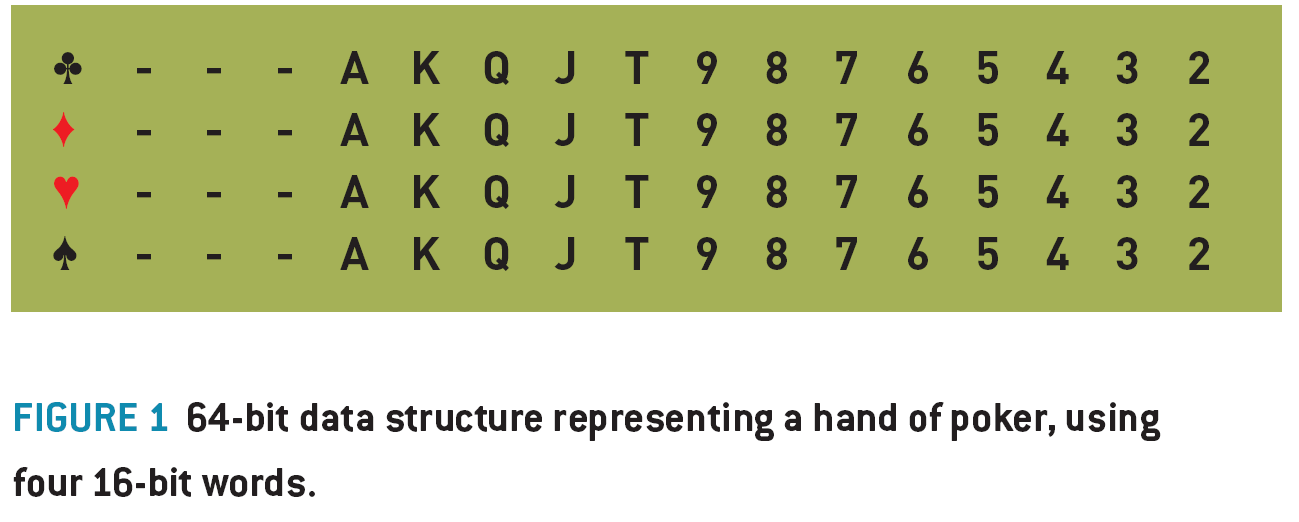
A “Hand” is a 52 bit data type, where each bit represents a single card. This can be stored as four 16 bit words for ease of use, where each 16 bit word represents the potential cards in one suit (using 13 of the 16 bits) (figure 1)

A “Hand Type” is an integer representing the type of poker hand you have, where 0= no pair, 1=pair, 2=two pair, 3=trips, 4=straight, 5=flush, 6=full house, 7=quads, 8=straight flush.

ENCODING HAND VALUES

A “Hand Value” is a 32 bit integer representing the relative value or strength of any hand of cards. By comparing two hand values, you can see which hand is stronger in a game of poker.
The hand value can conveniently be represented as a series of six 4-bit nibbles, where the most significant nibble represents the Hand Type, then the next five nibbles represent the different ranks of the cards in the order of significance to the hand value. (figure. 2)

Example 1: AH QD 4S KH 8C is a “no pair” hand type (sometimes called a “high card” , or in this case “Ace high” ). So, the hand type nibble is set to 0. The remaining nibbles in the Hand Value are filled out with the ranks of the five cards in descending order. (A, K, Q, 8, 4), which translated into rank indices: 12,11,10,6,2 (or C,B,A,6,2 in hexadecimal), and when combined with the hand type (0) in the high nibble, gives us a 32 bit integer: 0x000CBA62.

The individual suits of the cards are basically ignored in the final hand value. The only time suit is significant is when it contributes to a flush. Also, note the top two nibbles of the Hand Value are always zero.

Example 2: 4D JD 3D 4C AD is a pair of fours, with Ace, Jack, Three kickers. The hand type is a pair, (type 1), then the ranks follow, starting with the rank of the pair, then the ranks of the kickers, so 4,A,J,3, which gives us 0x0012C910.

Example 3: 7C, 6C, 5C, 4C, 3D is a straight (type 4). More specifically it’s a seven high straight. The only rank of import here is the seven (rank 5). So the hand value is encoded as 0x00450000. We save ourselves a bunch of instructions in ignoring the four low cards after we’ve determined it is a straight.

Look at the resultant hand values of the above examples, you can clearly see how the better hands always have a higher hand value, making determining the wining hand a simple comparison.

CALCULATING HAND VALUES

What we now need is a function that takes a hand, and returns a hand value. This involves determining the hand type, then inserting the nibbles for the hand ranks, as above.

A hand is four words (clubs, diamonds, hearts, spades) of 13 bits each. 13 bits can be arranged in just 8192 combination, which means we can accelerate the evaluation of a hand by pre-calculating 8K tables of things like the number of bits set in a (13 bit) word (if you have five or more of the same suit, then you’ve got a flush), or the highest card of any straight in the hand. You can also pre-calculate a table of the highest five cards from a particular bit combination, which you can then use to set the kicker cards.

If you calculate ranks = (hearts | diamonds | clubs | spades) then the value ranks is a bit-field with a bit set for every card rank that you have at least one of. The number of bits set here is the number of unique ranks you have. We calculate the number of bits in each of hearts, diamonds, clubs and spades, and subtract the number of bits in the unique ranks, giving the number of duplicated ranks, to be used as the basis of determining what type of hand you have.

Example: if you have 2D AS AH 2C 2H, you can very quickly determine that you have five cards, that there are just two unique ranks, and hence you must have either a full house or four of a kind. A few more simple tests will determine exactly what you have. The entire evaluation function will consist of tests like this, gradually whittling down the possible hand types.

Since the function consists mostly of bitwise operations, table lookups and simple comparisons, it is going to be very fast. It’s also very amenable to fine tuning optimization, and the exact implementation will depend on the target architecture. You may be able to take advantage of some processor specific instructions to greatly improve the efficiency.

CALCULATING HAND STRENGTH

Hand strength is the probability that you will win the hand, given your hole cards, the community cards, and the opponents who remain in the hand. Hand strength is a floating point number between 0.0 (certain loss) and 1.0 (certain win). For example, a HS of 0.33 means you have a 33% chance of winning.

The easiest and most flexibly way of calculating the HS is to simulate the progress of the game a very large number of time, and count the number of those times you win. Say you simulate the game 1,000 times, and in the simulation, you win 423 games, then you have a high degree of certainty of having an approximate HS of 423/1000, or 0.423.

The procedure for simulating a game is very simple:

Create a pack of cards
Set score = 0
Remove the known cards (your hole cards, and any community cards)
Repeat 1000 times (or more, depending on CPU resources and desired accuracy)
Shuffle the remaining pack
Deal your opponent’s hole cards, and the remaining community cards
Evaluate all hands, and see who has the best hands
If you have the best hand then
Add 1/(number of people with the same hand value) to your score (usually 1)
End if
end repeat
Hand Strength = score/number of loops (1000 in this case).

To be more accurate, we have to run our simulation with people dropping out if they are dealt hole cards below a certain threshold. In practice, the determination of if a player stays in or not in a simulation is a probabilistic function of the strength of their hole cards, their table position, their stack size, the blind size and their previous behavior. For now we can just modify the simulation, so after dealing the opponents hole cards, remove any non-blind players with hole cards worse than, say, a pair of sixes. While not particularly elegant, it will still give you a useful number.

POT ODDS

The pot odds number is the ratio of your bet or call to the size of the pot after you bet (the amount you will win). For example, if the bet is $20, and there is $40 in the pot, then the pot odds are 20/(20+40) = 0.333.

RATE OF RETURN

Rate of return is the “on average” proportion of how much you will multiply your bet by, if you stay in the hand.

Rate of Return = Hand Strength / Pot Odds.

The base strategy we implement is to mostly stay in hands with a rate of return greater than 1.

THE FOLD/CALL/RAISE DECISION

For each round of betting the computer needs to decide if it is going to fold, call or raise (The FCR decision). Ignoring the question for the moment of how much to raise for now, then given a Rate of Return (RR), it’s possible to provide a very simple (yet useful) mapping between RR and FCR.

If RR < 0.8 then 95% fold, 0 % call, 5% raise (bluff)
If RR < 1.0 then 80%, fold 5% call, 15% raise (bluff)
If RR <1.3 the 0% fold, 60% call, 40% raise
Else (RR >= 1.3) 0% fold, 30% call, 70% raise
If fold and amount to call is zero, then call.

Don’t pay too much attention to the precise percentages listed above, the numbers will depend on the way you calculate your hand strength, and you’ll want to vary them depending on which betting round you are in. You will also want to vary these numbers to create players with different personalities.

Using this very simple mapping between the RR and the FCR decision can give you a surprisingly reasonable and entertaining player. They will tend to play strong hands, they will occasionally bluff, they won’t scare easy if their hand is good, and they will abandon weak hands when raised, and they will stick around on a reasonable chance of a flush or straight draw, making for entertaining gameplay.

The fact that none of the percentages is 100% is also important. That means you can never deduce the hand strength of your AI opponent based on their actions (unless they fold, where the information does not really help you). If they raise, then they could have any kind of hand strength – probably a good one, but it might be the 1 in 20 times when they are bluffing with a very weak hand.

STACK PROTECTION

The simple rules above work well when your stack of chips is large and the blinds are small. However as your stack shrinks and the blinds increase then the amount of money you need to commit to stay in a hand can become a very substantial proportion of your stack. Also, occasionally other players might go “all-in” , betting their entire stack of chips, so we need some logic to prevent the AI from making bad calls when short stacked.

Say you have AD, 2D and the flop is QC, KC, 2C. So you have a pair of twos, but there is a possible flush out there. There is $500 in the pot and the bet is $100 to stay in against two player, but it’s your last $100. The pot odds are 100/600 = 0.1666, your hand strength is 0.297, so your rate of return is about 1.8. So if you could play this situation over and over again you would make on average an 80% profit each time. However, it’s your last $100, and you have about a 70% chance of loosing everything. Don’t make that bet!

To handle this we can use a simple heuristic, along the lines of:

“If my proposed bet will substantially commit my stack, then don’t do it unless I have a strong chance of winning”

which might be implemented in part by:

“if (stack- bet) < (blind * 4) and (HS < 0.5) then fold”

Meaning if the call would leave you with less than four times the big blind, then don’t call unless you have a greater than 50% chance of winning.

Poker is a complex game, with a surprisingly large number of different types of situations like this that you have to handle somehow. I recommend you have as few special cases as possible, as it reduced the risk of an exploit being introduced into the game via some obscure special case. However, you should anticipate a number of heuristics (rules of thumb) being hard coded into the AI logic.

TESTING POKER AI

Playing a quick single table game of Texas Holdem takes around 30 minutes on average with human players. Ideally you would perform your testing by having human players play against the AI and trying to find problems with it. Unfortunately, due to the random hands being dealt, it’s very easy for one player to simply get lucky and win the game with sub-par logic, or even flawed logic. I’ve found it takes at least ten games to begin to get a clear picture of the qualities of an AI player, and more like a hundred games to be really sure. This often creates an unreasonably burden on the testing department, and introduces a very long delay in getting feedback on AI changes.

The solution is automated testing. The AI should be set up so that different variants of AI can play against each other in a very high speed set of games. You should also code a few simplistic poker AI’s into the mix, such as an AI that always goes all in, or another that simply always raises with a hand better than a pair of fives. Then you set your AI loose against these opponents, and make sure that it wins the appropriate percentage of games. If you coded your evaluation and simulation appropriately, then you should be able to simulate an entire game in about a second. (You might want to reduce the iterations of the simulation a bit to speed up testing).

The best use of your human testers is to try to get them to find an exploit of the AI, then you can codify this exploit into a temporary AI opponent to include in your test suite. You can then tweak your AI until it defeats the exploit, while still being able to defeat all the other (standard) opponents.

MORE WORK

What I’ve set out here is just a foundation for poker AI. By following the process laid out here you will get a reasonably strong and entertaining opponent. Here’s a quick list of the topics you might want to look into

Ӣ Pre-flop hand strength tables
Ӣ Opponent modeling.
Ӣ Implied Odds.
Ӣ Personality modeling
Ӣ Positional play
Ӣ Probabilistic search space
Ӣ Game theory and Nash Equilibrium.

RESOURCES:

– Sklansky, David, The Theory of Poker, 1999, Two Plus Two Publishing. – Provides various discussion of pot odds, implied odds, etc, with many heuristics that might be useful.
– The University of Alberta Computer Poker Research Group:
http://www.cs.ualberta.ca/~games/poker/ A number of research papers on implementing poker AI.
– Hold’em Killer, Evin Peretz, http://www.holdemkiller.blogspot.com/ – A blog on implementing poker AI.
– Poker-Eval, http://freshmeat.net/projects/poker-eval/ – A GPL Licensed poker hand evaluation library.

Debug and Release

Filed under: Game Development,Inner Product — Mick West @ 6:05 pm

This article originally appeared in the “Inner Product” column, Game Developer Magazine, October 2005

Introduction

Game projects usually have a number of “build configurations” , which control how the game code is compiled and linked into the game executable. Each build configuration, or build mode, builds the game with varying amounts of additional debugging code, and with the optimization options modified to aid debugging. Microsoft’s Visual Studio has by default just two: “Debug” and “Release” . The idea is that you will develop your game in Debug mode, making it easier to find bugs, and then you ship it in Release mode, with debugging code removed and optimizations switched on to make your code small and fast.

This division usually starts out fine. At the start of a game development cycle there are not too many assets in the game, level maps are small, not much of the logic is implemented and the CPU is rarely taxed. But after a few months of development, things start to get into the game. As the quantity of game assets, entities and logic approaches the level of the final game, debug mode becomes unusably slow. This leads the development team to switch to using release mode for day-to-day development work.

This situation can make bugs a lot harder to track down. The traditional release mode lacks debugging code and assertions. When the programmer attempts to reproduce the bugs in Debug mode, they first have to rebuild in Debug mode (which can take a very long time) then the code runs at a really slow frame rate, making it very difficult to reproduce the bug, and sometimes the bugs cannot be reproduced at all, due to the different configuration and initialization of memory.

I argue that the traditional division into Debug and Release is inappropriate for game development. Debug mode and release mode as traditionally envisaged should no longer be considered useful options, and should be replaced by a single build configuration “develop mode” that should be used at all stages of development.

Debug and Release mode

When you set up a project in Microsoft Visual Studio, you get two “build configurations” : Debug and Release. The distinction between these seems obvious: You use “Debug” to debug the project, and when it’s ready to ship you switch over to “Release”

This distinction is usually found in any game development project, and sometimes it’s extended to some additional configurations, like “ExtraDebug” , “Final” or “Submit” .

The intent of debug mode is to make the code easier to debug. Now we’ve become so used to having the distinction between debug and release over the years that it’s useful to take a step back and see exactly why we needed a debug mode in the first place.

A common misconception that I’d like to clear up right away is that you can’t use the debugger unless you build your code in debug mode. This is simply not true. The debugger will work just fine in release mode, but some aspects will be a bit harder to debug.

The idea behind debugging mode is to make it as easy as possible to track down bugs in your code. This results in two major differences:
1) The code is compiled in such a way that the debugger works as well as possible.
2) Extra code is compiled in, usually in the form of assertions, to trap bugs as early as possible, and to provide additional debugging information.

Optimization: In debug mode, optimization is disabled, so the code runs a lot slower. Why is this? Well, optimization involves re-ordering the sequences of assembly instructions so there is not always a direct correlation between a group of assembly instructions and a line of C++ code. So when you step through your code in the debugger, it’s not always clear exactly where you are in the code, and the PC might jump oddly between lines.

Also, optimizing involves keeping values in registers instead of memory as frequently as possible. So, local variables that are not used very much are not stored in the local stack frame. This means that in the debugger you often can’t examine the contents of a local variable in optimized code, as one you step past the code that uses it, the value no longer exists. In debug mode the local variables always have local storage for each local variable, so you can always examine their values in the debugger.

Inline expansion: Another form of optimization is the expansion of inline functions. This is done to clarify the flow of control in the debugger. If an inline function is expanded inline then you can’t step “into” it, and you can’t step “over” it. It almost becomes invisible to the debugger.

Debug Code: Besides the optimizations, you usually add additional “debugging code” to your program to help track down bugs. To this end you generally have some symbols defined that tell you at compile time which build configuration you are using, so you can conditionally compile code in for debugging.

In Microsoft visual studio these symbols are “DEBUG” which if defined when you are in debug mode, and “NDEBUG” which is defined when you are not in debug mode (or in release mode)

Assertions: Everyone should be familiar with assertions. Assertions are additional line of code that are sprinkled through the program to ensure that everything is as it should be. Basically it’s a macro that checks (asserts) that a condition that you know should be true actually is true. If the assert fails, then the program execution halts, and you can see what went wrong. Asserts should be your most useful tool in debugging your code.

Let’s have a quick look at Microsoft’s implementation of the assert macro:

#ifdef NDEBUG
#define assert(exp) ((void)0)
#else
#define assert(exp) (void)( (exp) || (_assert(#exp, __FILE__,__LINE__), 0) )
#endif /* NDEBUG */

As you can see, the assert is compiled away to nothing when you build in release mode. This makes sense, as when you release the game, you don’t want asserts going off. Plus they take up space, and all those extra checks slow down the game.

Debug and Browse information: For the debugger to work it needs to know how to link the code it is executing to the original source. This information is generated during compilation and linking and is referred to as “debug info” . In many “release” configurations the debug information is switched off. This is generally to make the project build faster, and to make the executable smaller. An executable .ELF file built with GNU C++ can be anything use to 100MB in size when built with full debug info, compared with a 3-5MB file without debug info.

Memory allocation and initialization: Memory allocation is the source of many bugs. So it makes sense to have extra debugging code in your memory allocator. Typically memory will be initialized to a known value when it is allocated. The pattern of allocations will also differ, as blocks have extra debug info added. Since most games use their own custom allocators, the differences vary. But nearly all games will have some difference in memory allocation between debug and release modes.

Uninitialized variables are a common source of error. Generally you should be catching such problems at compile time. But if not, then you need to realize that their behavior will differ in release and debug modes. In debug modes, local variables are more likely to have actual storage, and depending on your precise build configuration and compiler, they will probably be initialized to zero in debug mode. In release mode the uninitialized variable will be some random value – whatever happened to be in memory or the register used.

Game are real time applications. They have to run at a reasonable speed in order for you to say that they are working. So if the debug mode is very slow, then it’s not going to be practical to use the debug mode as the development build – the build used by artists and level designers implementing assets, and by programmers implementing new features in code or script.

However games are also incredibly complex applications, where the game engine is often still in development while the game content is being created and implemented using that game engine. If everyone is using the release mode for development then it makes it very difficult to track down the bugs that inevitably arise in a development environment.

Clearly then neither of the traditional build modes is suitable for game development. I’d like to make the case that a single hybrid mode should be used for 99% of all development. This hybrid mode (which I’ll call “Develop Mode” ) should be fast enough so that gameplay is not affected, and yet contain enough debugging features so that bugs are caught early, and easily tracked down. I’ll also make the case that develop mode should essentially be the configuration mode your game ships with.

Develop Mode

Assertions switched on. Developing without assertions is like driving with your eyes closed. You’ll know when you crashed, but you won’t know why you crashed, and your crashes will be much worse. Having assertions on all the time during development will greatly improve the rate at which you find and fix bugs.

Optimization switched on. Your code needs to be fast if develop mode is going to be used by artists and level designers. Sure, you can’t tell exactly what is going on in the debugger, you won’t be able the see the contents of local variables. But you will be still be able to identify the place where in the code the crash occurs, see the call stack and roughly follow the logic flow. If you need more information then often the solution is to add more assertions. You can add logging calls to track the contents of variables, and if all else fails you can temporarily switch on optimization.

Inline Expansion switched on. Similar to optimization, but with games the inline expansion being off is often a far greater source of slow debug code than other aspects of optimization. Most games will have some kind of custom 3D vector class, usually with accessor functions, or overloaded [] operators that use inline functions. Having these functions be explicit adds a vast overhead to code execution. The benefit you get is simpler flow of execution in the debugger, something you rarely need. So, switch inlining back on.

Link without debug information – This one can be a vast time saver. The link stage of the edit-compile-link-run cycle can take over a minute, or even several minutes, depending on the type of project. The vast majority of that time is spent in generating debug information, when really all you want is the executable. Remember the compilation units are still being complied with debug information, so if the code crashes, and you want to go into the debugger, then you can just switch debug information back on and re-link, and you’ll have the debug information, but only when you actually need it.

Make your assertions fast. Assertions should never need more than 5% of your total CPU time. If you turn assertions on and your framerate plummets, then there may be a problem in the implementation of your assertion macro (many game developers implement their own version of assert). The majority of assertions are simply comparisons of two values, and usually one of these values is something the compiler will have in a register, and the other if frequently a constant. So your assertion should compile to two or three instructions that perform the test and then skip over the code that arranges the parameters and calls the assert handler. You should verify this by looking at the compiled code in the debugger.

Use assertions appropriately. Much as I love assertions, there is such a thing as too many assertions. Assertions in very low level functions are often testing the same thing over and over again. For example, collision detection code might use unit normals stored in the mesh. Since collision code runs a lot each frame, then adding an assertion to verify that the normals were of unit length might have a serious impact on framerate. Plus you’d be repeatedly checking the same normals over and over. In this case it might be better to verify the input just once when the mesh is initially loaded, or even when it’s originally generated.

In addition, putting assertions in at such a low level of the code is often hit and miss. The conditions that might cause the code to fail could occur very infrequently. You might have to play the game for hours in order to hit the triangle with a malformed normal. Here you want to use automated tests that ensure full coverage of the code and data. These tests can be run constantly, and need not be part of the develop build.

Ideally your develop mode should also be your release mode. This automatically eliminates that bane of game development: the bugs that only show up when the game is in release mode. The problem here is that you’ve got to devote up to 5% of your CPU time, and a chunk of memory, if you want to leave in all your assertions. The solution is obviously to budget for that from the start.

This may seem like a lot of ask. The harsh reality is that game developers are often scrambling for a few thousand extra bytes, and CPU time is never adequate. But consider the benefits of having just one build configuration up to and including the version you ship. There is no risk of obscure bugs popping up due to changes in the code. If you ship for console you can get back more useful information from publisher tests. If you ship on PC, you can add a facility for users to report assertions, which will allow you to get that patch out quicker.

If you ARE going to ship without assertions, for whatever reason, then make sure you budget enough time to test that version. The majority of your testing should be done on a version with assertions in, as you’ll track down ordinary bugs much quicker. But at some point you’ll need to test your final version. Just don’t switch off the assertions the day before you submit. It’s actually might be a good idea to occasionally test with assertions removed, as the different code configuration might bring more obscure bugs to the surface.

Reference and further reading

Rabin, S. Squeezing more out of Assert. Game Programming Gems 1.
Etherton, D. Designing and Maintaining Large Cross-Platform Libraries.. Game Programming Gems 4.
Hunt, A & Thomas, D. Leave Assertions turned on. The Pragmatic Programmer. p123.

Powered by WordPress