Cowboy Programming Game Development and General Hacking by the Old West

January 5, 2007

Multithreading Particle Sytems

Filed under: Game Development,Inner Product — Mick West @ 12:16 pm

OPTIMIZING A PARTICLE SYSTEM FOR MULTI-CORE ARCHITECTURE

This article was originally published in the “Inner Product” column in Game Developer Magazine, April 2006

Download the sample application:
DOWNLOAD
229K

In my February column I discussed the various ways you might extend a game engine to take advantage of multi-core processing. On method mentioned was “Forking from a single thread. In this month’s column I’m going to discuss how this is implemented in practice to speed up the processing of a particle system. I’ll present the code needed to get multi-threaded processing working, and then benchmark various approaches and configurations.

PARTICLE SYSTEM

Particles systems are very common in games. They consist of a large number of small objects that each has a low memory and processing overhead, allowing you to get a very large number of objects on screen. Particle effects are used to simulate fire, smoke, explosions and various other physical effects.

In the example code (available online at gdmag.com) I implement a simple 2D particle system that nonetheless performs a significant amount of processing per particle, including a collision check to allow the particle to interact with the environment. The test case simulates 80,000 particles. particle_screen.jpg
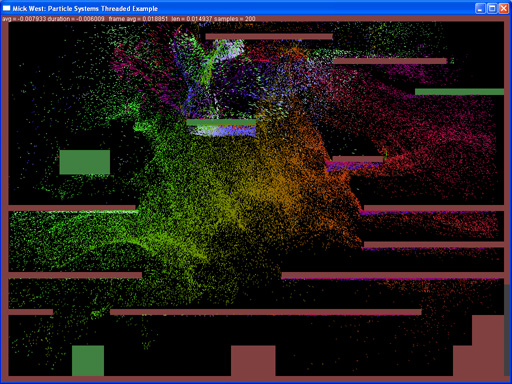
My test machine has a 3.2 GHz dual core Pentium 4 Extreme Edition with hyper-threading enabled. This configuration gives us four hardware threads. In theory this should enable us to run code up to 2.6 times as fast as a regular single core, non-hyper-threaded CPU. The Figure of 2.6 is arrive at by a theoretical 100% speed increase from using two cores, followed by a 30% increase from hyper-threading. In real-world tests, I actually got a 3.0x speed increase, slightly better than expected.

THE CODE

I have attempted to make the code duplicate what you might find in a real game engine. There is a particle class, which has an update() function. There is an array of particles, and a count of particles. To update the position of the particles, the particle manager code simply iterates over them and calls their update() function (listing 1).

Listing 1:

for (int i=0;i<n;i++)
	{
		mp_particles[i].Update(update_time);
	}

The update code itself moves the particle, and checks for collision with the environment, and updates the color of the particle based on the speed. (Listing 2). This is a fairly significant amount of code to be executed per particle.

Listing 2:

void CParticle::Update(float time)
{
	m_old_pos = m_pos;
	Vector2 pos2 = m_pos + m_vel * time;
	Vector2 to = m_pos - Vector2(x,y);
	float force = 1000.0f/to.Length2();
	m_vel += to * force;
	m_vel -= m_vel * 0.03f;
	m_color = 0xff800000 + (int)m_vel.Length();
	if (whisker.CheckCollision(m_pos, pos2)) 	{
		m_pos = whisker.GetPoint() + 0.01f * whisker.GetNormal();
		m_vel = m_vel - 2.0f * DotProduct((m_vel),whisker.GetNormal()) * whisker.GetNormal();
	} else {
		m_pos = pos2;
	}
}

This type of processing is an ideal candidate for parallel processing. The order of processing the particles is unimportant, since they do not interact with each other. The particle processing does not use any common resources. The method of processing by stepping through an array can easily be broken into sub-sections of the array.

FORKING

So the first thing I tried was forking threads to process the particles in groups. To do this the particle manager’s update loop changed from Listing 1, to Listing 3.

Listing 3:

for (int t=0;t<MAX_THREAD;t++) {
  ThreadIndex[t] = t;
  thThread[t] = CreateThread(NULL,0,thParticleUpdate,(LPVOID)&ThreadIndex[t],0,&threadId);
}
WaitForMultipleObjects(MAX_THREAD,&thThread[0],true, INFINITE);
for (int t=0;t<MAX_THREAD;t++) {
  CloseHandle(thThread[t]);
}

This creates MAX_THREADS threads, which immediately begin executing. The main thread then waits at the call to WaitForMultipleObjects until all the threads are finished.

The value in MAX_THREADS should match the number of hardware threads your system is capable of supporting. In our case the optimal value is four, but we perform tests with one, two, three and four threads.

The thread that is created calls the function thParticleUpdate, shown in Listing 4. This divides the particles up into chunks based on the thread number. With four threads, the first thread will process particles, 0-19999, the second 20000-39999, the third 40000-59999 and the fourth 60000-79999.

Listing 4:

DWORD WINAPI thParticleUpdate(LPVOID p)
{
	int thread = *(int*)p;
	float time = update_time;
	int n = g_ParticleManager.m_num_particles;
	int step = n / MAX_THREAD;
	int start = step*thread;
	int end = step*(thread+1);
	if (thread == MAX_THREAD-1) end = n;
	for (int i=start;i<end;i++)	{
		g_ParticleManager.mp_particles[i].Update(time);
	}
}

WORKER THREADS

Since creating a thread incurs some overhead, it is best not to create threads every time we need to fork. Instead we can get functionally the same results by creating the threads upon program initialization, and then using events to signal the thread to start and indicate when it has stopped. This approach is known as using “worker threads” . The particle manager update function then just reduces to signaling the thread start events, and then waiting for the events to finish (Listing 5).

Listing 5

for (int t=0;t<MAX_THREAD;t++)
	SetEvent(thStartThreading[t]);
WaitForMultipleObjects(MAX_THREAD,&thStopThreading[0],true, INFINITE);

The threads themselves are initialized at startup, along with the arrays of events used to signal a thread to start, and for the threads to signal that they have completed (Listing 6)

Listing 6

for (int t=0;t<MAX_THREAD;t++){
    ThreadIndex[t] = t;
    thStartThreading[t] = CreateEvent(NULL, FALSE, FALSE, NULL);
    thStopThreading[t]  = CreateEvent(NULL, FALSE, FALSE, NULL);
    thThread[t] = CreateThread(NULL,0,thParticleUpdate,(LPVOID)&ThreadIndex[t],0,&threadId);
}

Then the function thParticleUpdate needs to be modified, so that instead of being a one-shot function, it is now a loop that continually executes the same piece of code whenever the thStartThreading flag is set. (Listing 7).

Listing 7:

DWORD WINAPI thParticleUpdate(LPVOID p)
{
	int thread = *(int*)p;
	while (1)
	{
		WaitForSingleObject(thStartThreading[thread],INFINITE);
		/* ”¦ BODY OF FUNCTION ”¦ */
		SetEvent(thStopThreading[thread]);
	}
}

MORE REALISM

In order for the tests to be more realistic, I also wanted to run them as if there was a physics engine taking up the majority of the processing time in a single thread. So I added another thread that just constantly multiplied two numbers together and stored the result (listing 7)

Listing 7:

float dummy_a = 1.1f;
DWORD WINAPI DummyThread(LPVOID p)
{
	while (dummy_a != 0)
		dummy_a *= 1.00001f;
	return 0;
}

This was then run in a separate thread. It’s not an ideal test, as it just constantly does work, rather than a fixed amount of work. But it roughly simulates the case where you can keep a thread busy for an entire frame.

RESULTS

I tested three software configurations: Forked threads, Worker threads and worker threads plus physics. Each of these configurations was tested with 1,2,3 and four processors, and the results were converted into a percentage of the time taken to update the particles in the normal manner (listing 1). The code was timed both for how long it took to update the logic (columns L1, L2, etc), and how long it too to execute a whole frame. (F1, F2, etc). Smaller numbers indicate less time taken, and hence faster.

After running in three different software configurations, I did three different hardware configurations. The test machine allowed me to disable both dual core and hyperthreading via the bios, so I tested with all three possible combinations. The Results are shown in table 1.

ANALYSIS

As we expected, the fastest execution is with four worker threads. The particle system is updated in one third of the time taken by the unthreaded approach. The frame rate is almost doubled – although in this test, the particle system takes up 2/3 of all CPU time.

The difference between using forking threads and using worker threads is very striking, with the worker thread approach being about 12% faster than using forked threads. This is presumably due to the overhead in creating a new thread. Whenever a thread is created, it needs memory allocated, including a default 1MB for the stack. This, and other overhead, makes constantly creating and destroying threads a drain on resources.

With the dummy physics thread in the mix, we see some slowdown, but really not as much as you might think, considering the dummy thread should be hogging 100% of one of the cores, leaving just the 30% hyperthread capacity, and the other processor. So why do we only see a slight drop in performance?

The answer is the windows scheduler is attempting to spread the work evenly amongst the threads, which means that it will constantly preempt the dummy thread in order to let the worker threads (and the main thread) execute. That’s why a simple loop is not a good test load. A more realistic dummy physics load would be to execute the loop a fixed number of times, and have the main thread stall until the dummy thread finishes each frame.

LESS CORES

Generally the fewer cores you have, the lower your performance. One initially surprising result was that by disable hyper-threading, the performance of the single threaded version actually improved slightly, with the framerate increasing 4%. This shows that if code is not specifically written with hyperthreading in mind, then enabling hyperthreading can actually hurt performance slightly. Some PC vendors allow you to choose your PC to be shipped with hyperthreading disabled.

This is unfortunate, as the potential is there for hyperthreading to greatly improve performance, and it would be a shame is people switched it off just because some games ran slowly with it enabled. Indeed, with a single core, and hyperthreading enabled, we get a very significant 24% improvement in framerate with two threads.

One interesting result is whenever there are two logical CPUs (either single core with hyperthreading, or dual core with no hyperthreading), then the performance drops drastically when moving from two threads to three threads. This is because we can now only execute two threads simultaneously. Since the execution time of a single worker thread is short, the task scheduler will not be able to share the work evenly, and so the first two threads might run to completion before the third thread even starts. It then runs with one CPU idle, giving a 25% decrease in performance. If the task were one that ran much longer, then the overhead of having three threads for two CPUs would be much less. Running four threads is only slightly slower than two threads as the work can be evenly divided.

CONCLUSIONS

Optimizing simple systems for multi-core and hyperthreaded machines is very straightforward, and yields very impressive results. Using worker threads instead of forked threads means that there is very little overhead in splitting up a task, and performance increases can be had even on systems with a relatively small number of objects.

The windows task scheduler usually does a good job of farming out the work to available processors. While you can force a particular thread onto a particular CPU using the SetThreadAffinityMask function, I did not see any performance gain from doing this. It might still be worth looking into though, depending on how your engine is structured.

Particle systems are just one of several potential things that could be optimized in this way. Anything that deals with a reasonable number of independent data objects is a candidate. Such things might include: skinning, debris physics, flocking or speech recognition. With appropriate synchronization methods, the multi-threaded approach can be extended to the updating of more complex interdependent objects, such as AI and game logic.

The best performance is gained by scaling your threads to match the available CPUs. On a fixed target like the Xbox 360, you can specifically target six hardware threads. On the PC, you can attempt to determine the number of CPUs available, but if in doubt, then four threads will generally work well. However you should consider that soon we will have quad-core hyperthreaded (such as Intel’s “Tigerton” ), machines, giving us eight logical CPUs. Ideally your engine should scale to the appropriate number of threads, and not introduce overhead on a single logical CPU machine.

RESOURCES

James Boer, Multithreaded Audio Programming techniques, Game Programming Gems 5, 2005, Charles River Media, Hingham, MA, p697

Intel Corporation’s multi-core articles, http://intel.com/software/multicore

AMD Corporation’s multi-core site: http://multicore.amd.com/en/
Evolve Your Hierarchy

Filed under: Game Development,Inner Product — Mick West @ 11:35 am

Refactoring Game Entities with Components

Up until fairly recent years, game programmers have consistently used a deep class hierarchy to represent game entities. The tide is beginning to shift from this use of deep hierarchies to a variety of methods that compose a game entity object as an aggregation of components. This article explains what this means, and explores some of the benefits and practical considerations of such an approach. I will describe my personal experience in implementing this system on a large code base, including how to sell the idea to other programmers and management.

GAME ENTITIES

Different games have different requirements as to what is needed in a game entity, but in most games the concept of a game entity is quite similar. A game entity is some object that exists in the game world, usually the object is visible to the player, and usually it can move around.

Some example entities:

  • Missile
  • Car
  • Tank
  • Grenade
  • Gun
  • Hero
  • Pedestrian
  • Alien
  • Jetpack
  • Med-kit
  • Rock

Entities can usually do various things. Here are some of the things you might want the entities to do

  • Run a script
  • Move
  • React as a rigid body
  • Emit Particles
  • Play located audio
  • Be packed up by the player
  • Be worn by the player
  • Explode
  • React to magnets
  • Be targeted by the player
  • Follow a path
  • Animate

TRADITIONAL DEEP HIERARCHIES


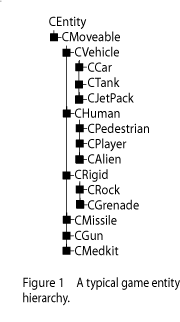
The traditional way of representing a set of game entities like this is to perform an object-oriented decomposition of the set of entities we want to represent. This usually starts out with good intentions, but is frequently modified as the game development progresses – particularly if a game engine is re-used for a different game. We usually end up with something like figure 1, but with a far greater number of nodes in the class hierarchy.

As development progresses, we usually need to add various points of functionality to the entities. The objects must either encapsulate the functionality themselves, or be derived from an object that includes that functionality. Often, the functionality is added to the class hierarchy at some level near the root, such as the CEntity class. This has the benefit of the functionality being available to all derived classes, but has the downside of the associated overhead also being carried by those classes.

Even fairly simple objects such as rocks or grenades can end up with a large amount of additional functionality (and associated member variables, and possibly unnecessary execution of member functions). Often, the traditional game object hierarchy ends up creating the type of object known as “the blob” . The blob is a classic “anti-pattern” which manifests as a huge single class (or a specific branch of a class hierarchy) with a large amount of complex interwoven functionality.

While the blob anti-pattern often shows up near the root of the object hierarchy, it will also show up in leaf nodes. The most likely candidate for this is the class representing the player character. Since the game is usually programmed around a single character, then the object representing that character often has a very large amount of functionality. Frequently this is implemented as a large number of member functions in a class such as CPlayer.

The result of implementing functionality near the root of the hierarchy is an overburdening of the leaf objects with unneeded functionality. However, the opposite method of implementing the functionality in the leaf nodes can also have unfortunate consequence. Functionality now becomes compartmentalized, so that only the objects specifically programmed for that particular functionality can use it. Programmers often duplicate code to mirror functionality already implemented in a different object. Eventually messy re-factoring is required by re-structuring the class hierarchy to move and combine functionality.

Take for example the functionality of having an object react under physics as a rigid body. Not every object needs to be able to do this. As you can see in figure 1, we just have the CRock and the CGrenade classes derived from CRigid. What happens when we want to apply this functionality to the vehicles? You have to move the CRigid class further up the hierarchy, making it more and more like the root-heavy blob pattern we saw before, with all the functionality bunched in a narrow chain of classes from which most other entity classes are derived.

AN AGGREGATION OF COMPONENTS

The component approach, which is gaining more acceptance in current game development, is one of separating the functionality into individual components that are mostly independent of one another. The traditional object hierarchy is dispensed with, and an object is now created as an aggregation (a collection) of independent components.

Each object now only has the functionality that it needs. Any distinct new functionality is implemented by adding a component.

A system of forming an object from aggregating components can be implemented in one of three ways, which may be viewed as separate stages in moving from a blob object hierarchy to a composite object.

OBJECT AS ORGANIZED BLOB

A common way of re-factoring a blob object is to break out the functionality of that object into sub-objects, which are then referenced by the first object. Eventually the parent blob object can mostly be replaced by a series of pointers to other objects, and the blob object’s member functions become interface functions for the functions of those sub-objects.

This may actually be a reasonable solution if the amount of functionality in your game objects is reasonably small, or if time is limited. You can implement arbitrary object aggregation simply by allowing some of the sub-objects to be absent (by having a NULL pointer to them). Assuming there are not too many sub-objects, then this still allows you the advantage of having lightweight pseudo-composite objects without having to implement a framework for managing the components of that object.

The downside is that this is still essentially a blob. All the functionality is still encapsulated within one large object. It is unlikely you will fully factor the blob into purely sub-objects, so you will still be left with some significant overhead, which will weight down your lightweight objects. You still have the overhead of constantly checking all the NULL pointers to see if they need updating.

OBJECT AS COMPONENT CONTAINER

The next stage is to factor out each of the components (the “sub-objects” in the previous example) into objects that share a common base class, so we can store a list of components inside of an object.

This is an intermediate solution, as we still have the root “object” that represents the game entity. However, it may be a reasonable solution, or indeed the only practical solution, if a large part of the code base requires this notion of a game object as a concrete object.

Your game object then becomes an interface object that acts as a bridge between the legacy code in your game, and the new system of composite objects. As time permits, you will eventually remove the notion of game entity as being a monolithic object, and instead address the object more and more directly via its components. Eventually you may be able to transition to a pure aggregation.

OBJECT AS A PURE AGGREGATION

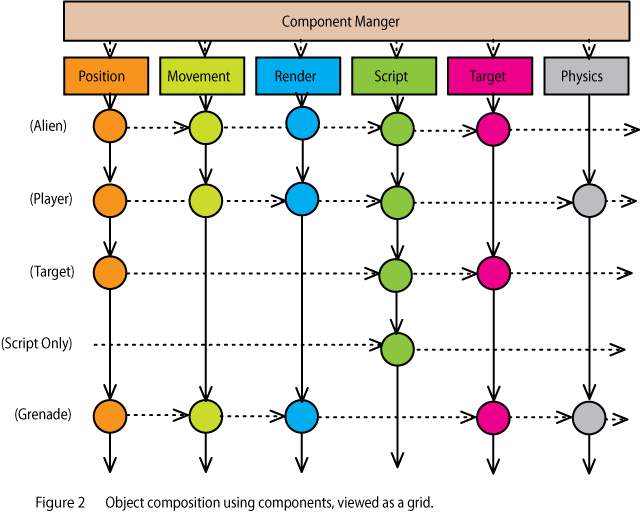
In this final arrangement, an object is simply the sum of its parts. Figure 2 shows a scheme where each game entity is comprised of a collection of components. There is no “game entity object” as such. Each column in the diagram represents a list of identical components, each row can be though of as representing an objects. The components themselves can be treated as being independent of the objects they make up.

PRACTICAL EXPERIENCE

I first implemented a system of object composition from components when working at Neversoft, on the Tony Hawk series of games. Our game object system had developed over the course of three successive games until we had a game object hierarchy that resembled the blob anti-pattern I described earlier. It suffered from all the same problems: the objects tended to be heavyweight. Objects had unnecessary data and functionality. Sometimes the unnecessary functionality slowed down the game. Functionality was sometimes duplicated in different branches of the tree.

I had heard about this new-fangled “component based objects” system on the sweng-gamedev mailing list, and decided it sounded like a very good idea. I set to re-organizing the code-base and two years later, it was done.

Why so long? Well, firstly we were churning out Tony Hawk games at the rate of one per year, so there was little time between games to devote to re-factoring. Secondly, I miscalculated the scale of the problem. A three-year old code-base contains a lot of code. A lot of that code became somewhat inflexible over the years. Since the code relied on the game objects being game objects, and very particular game objects at that, it proved to be a lot of work to make everything work as components.

EXPECT RESISTANCE

The first problem I encountered was in trying to explain the system to other programmers. If you are not particularly familiar with the idea of object composition and aggregation, then it can strike you as pointless, needlessly complex, and unnecessary extra work. Programmers who have worked with the traditional system of object hierarchies for many years become very used to working that way. They even become very good at working that way, and manage to work around the problems as they arise.

Selling the idea to management is also a difficult. You need to be able to explain in plain words exactly how this is going to help get the game done faster. Something along the lines of:

Whenever we add new stuff to the game now, it takes a long time to do, and there are lots of bugs. If we do this new component object thing, it will let us add new stuff a lot quicker, and have fewer bugs.”

My approach was to introduce it in a stealth manner. I first discussed the idea with a couple of programmers individually, and eventually convinced them it was a good idea. I then implemented the basic framework for generic components, and implemented one small aspect of game object functionality as a component.

I then presented this to the rest of the programmers. There was some confusion and resistance, but since it was implemented and working there was not much argument.

SLOW PROGRESS

Once the framework was established, the conversion from static hierarchy to object composition happened slowly. It is thankless work, since you spend hours and days re-factoring code into something that seems functionally no different to the code it replaces. In addition, we were doing this while still implementing new features for the next iteration of the game.

At an early point, we hit the problem of re-factoring our largest class, the skater class. Since it contained a vast amount of functionality, it was almost impossible to re-factor a piece at a time. In addition, it could not really be re-factored until the other object systems in the game conformed to the component way of doing things. These in turn could not be cleanly refactored as components unless the skater was also a component.

The solution here was to create a “blob component.” This was a single huge component, which encapsulated much of the functionality of the skater class. A few other blob components were required in other places, and we eventually shoehorned the entire object system into a collection of components. Once this was in place, the blob components could gradually be refactored into more atomic components.

RESULTS

The first results of this re-factoring were barely tangible. But over time the code became cleaner and easier to maintain as functionality was encapsulated in discreet components. Programmers began to create new types of object in less time simply by combining a few components and adding a new one.

We created a system of data-driven object creation, so that entirely new types of object could be created by the designers. This proved invaluable in the speedy creation and configuration of new types of objects.

Eventually the programmers came (at different rates) to embrace the component system, and became very adept at adding new functionality via components. The common interface and the strict encapsulation led to a reduction in bugs, and code that that was easier to read, maintain and re-use.

IMPLEMENTATION DETAILS

Giving each component a common interface means deriving from a base class with virtual functions. This introduces some additional overhead. Do not let this turn you against the idea, as the additional overhead is small, compared to the savings due to simplification of objects.

Since each component has a common interface, it is very easy to add additional debug member functions to each component. That made it a relatively simple matter to add an object inspector that could dump the contents of the components of a composite object in a human readable manner. Later this would evolve into a sophisticated remote debugging tool that was always up to date with all possible types of game object. This is something that would have been very tiresome to implement and maintain with the traditional hierarchy.

Ideally, components should not know about each other. However, in a practical world, there are always going to be dependencies between specific components. Performance issues also dictate that components should be able to quickly access other components. Initially we had all component references going through the component manager, however when this started using up over 5% of our CPU time, we allowed the components to store pointers to one another, and call member functions in other components directly.

The order of composition of the components in an object can be important. In our initial system, we stored the components as a list inside a container object. Each component had an update function, which was called as we iterated over the list of components for each object.

Since the object creation was data driven, it could create problems if the list of components is in an unexpected order. If one object updates physics before animation, and the other updates animation before physics, then they might get out of sync with each other. Dependencies such as this need to be identified, and then enforced in code.

CONCLUSIONS

Moving from blob style object hierarchies to composite objects made from a collection of components was one of the best decisions I made. The initial results were disappointing as it took a long time to re-factor existing code. However, the end results were well worth it, with lightweight, flexible, robust and re-usable code.

Resources

Scott Bilas: GDC 2002 Presentation: A Data-Driven Game Object System
http://scottbilas.com/files/2002/gdc_san_jose/game_objects_slides.pdf

Bjarne Rene: Component Based Object Management. Game Programming Gems 5, 2005, page 25.

Kyle Wilson: Game Object Structure: Inheritence vs Aggregation, 2002, http://gamearchitect.net/Articles/GameObjects1.html

Multi-core Processors

Filed under: Game Development,Inner Product — Mick West @ 10:19 am

This article originally appeared in the “Inner Product” column in Game Developer Magazine, February 2006

Next generation game platforms are increasingly making use of multiple processors to deliver more computing power. The Xbox 360 has three symmetrical CPUs running two hardware thread each. The PS3 has one master CPU with seven separate “SPE” processors. The Nintendo Revolution is probably dual threaded. Newer gaming PCs have dual core hyper-threaded processors.

Programmers who were used to programming for a single core are now increasing faced with the challenge of translating their programming skills to a multi-core system. Ideally you want to fully utilize the power of all the processors that you have available to you. A processor idling is a processor wasted. In this article I describe some of the issues involved with this, and discuss a few potential ways developers might architect their engines to more fully utilize the potential processing power.

DON’T DO IT?


The simplest option is to just ignore the additional CPU resources, and run all your code from a single thread on a single CPU. (See Figure 1).

All the examples will use this simplified version of the systems in a game engine. Note that the “rendering” portion here is the CPU contribution to rendering (things like high level visibility determination, and preparing the data stream for the GPU to process). The GPU processing is not shown.

Here the flow of execution is very straightforward. We have the game physics, followed by the game logic, and finally the CPU contribution to rendering. Each of these very high-level tasks also has a strict order of mid-level tasks. The physics, for example, first processes the rigid bodies, then the IK animation, and finally the particle systems. This set of systems here is roughly what you might find in a current single processor game.

While this option is obviously not going to take advantage of any of the additional processing power, it does greatly simplify the task of programming the game. Whether this is the best choice depends very much on the type of game you are programming, your schedule, and the programming resources available to you.

Remember the GPU is still responsible for a large portion of the visual quality of your game. If the game contains a relatively low amount of moving and interacting objects (such as a golf game), then you may well be able to get away with using a single processor.

The decision to go single threaded can also greatly simplify the debugging process. Multi-threaded programs can be very difficult to debug. If your schedule is short, and if you’re already got a single-threaded code-base up and running, then it may well be cost effective to simply ignore the extra CPUs, at least for this version of the game.

MANUALLY THREADED TASKS


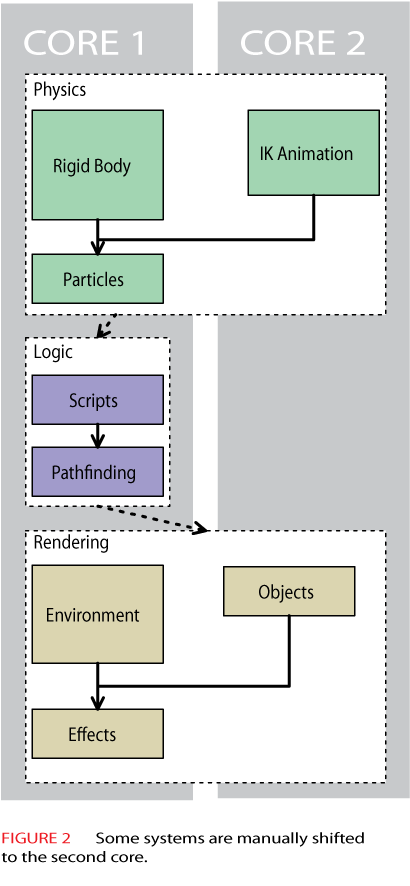
Some mid level tasks are sufficiently decoupled that they can be executed in any order, and even in parallel. If you are able to identify two such tasks, then in theory you should be able to save the processing time that would be taken up by the shorter of the two tasks, by running the two tasks in parallel. (Figure 2)

Here we see the second core has been partially utilized. The rigid body physics and the IK animation are now running concurrently. The time saved here is again the shorter of the two tasks (the IK animation).

The logic portion of the pipeline is not threaded. Typically things such as AI and game object logic are very dependent on the order of execution, and so it is difficult to split an existing AI system into separate threads without introducing a large number of interesting bugs.

Rendering also has some parallelism shown, with the object rendering running at the same time as the environment rendering.

This approach of selectively shifting certain large tasks into separate threads (and onto separate CPU cores), is something you might do as a quick and easy step when retro-fitting an existing engine to be take advantage of multiple cores. The implementation will vary greatly according to the dependencies between systems in your engine. For example, it might be impossible to perform environment rendering at the same time as object rendering if they both share some resource, such as a pool of vertex buffers, which is not thread safe.

The disadvantage is that your have a fairly limited number of pieces of processing with which to play. There are very few ways in which you can arrange things so that your engine will still work, and hence you will end up making poor use of the second CPU core.

Since the parallel tasks are doing very different things, you will also not be making the best use of your shared cache on a hyper-threaded system.

FORKING FROM A SINGLE THREAD

If your high level systems are not suitable for running in parallel, then you should turn to the low level. Many systems comprise of running a similar piece of code over a large number of objects. If the order of processing of the objects is not important then you can start a very short-lived second thread to process half the objects.

You can visualize this as your main thread “forking” into two (or more) threads, each thread processing some of the data, and skipping over unprocessed data, until all the data is processed. The forked thread(s) then terminate, leaving the main thread to continue along the normal path of execution.


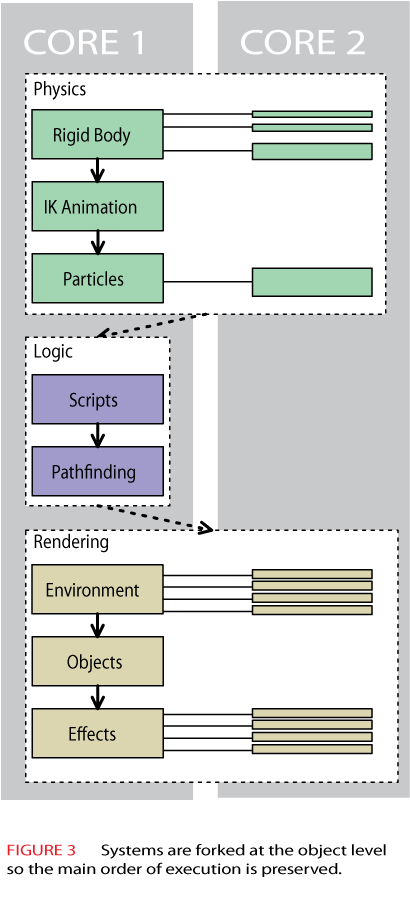
Figure 3 shows how the flow of execution works. The main thread in Core 1 is identical to our simplistic single threaded “solution” in Figure 1. The only difference is that when the main thread is able to process a number of objects concurrently, it forks to process those objects, then continues as a single thread.

Maintaining the original order of execution is a great advantage in simplifying the interactions between systems in your engine. This kind of execution also makes better use of shared caches, since the two threads are running the same code and operate on nearby data.


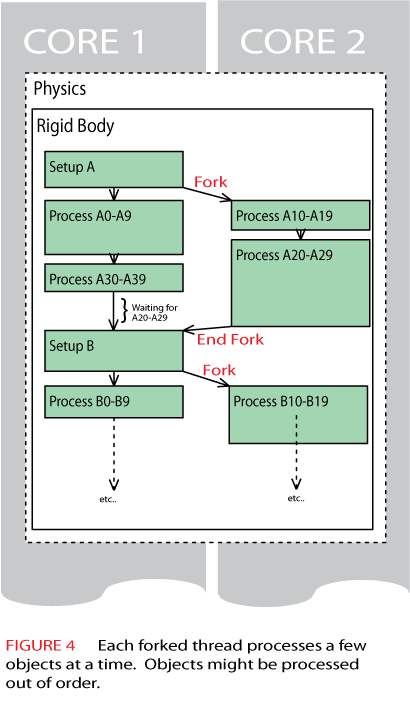
Figure 4 shows how the threads might be forked down at the object level. To reduce overhead, the forks normally process batches of objects. Here we are processing ten objects at a time. First we see a brief setup phase for one set of objects of type A. Then both cores simultaneously begin processing objects, with core 1 processing objects A0-A9 and core 2 processing A10-A19.

In this example, the processing of objects takes different amounts of time. Here core 2 finishes its batch first, and immediately starts on objects A20-A29. Shortly after that, core 1 quickly starts and finishes off A30-A39.

You can clearly see here that the order of processing the objects cannot be guaranteed. It will probably not be the same from one frame to the next, and will very likely differ from one supposedly identical run to the next (say with input recorded for a demo). This can lead to obscure bugs when objects are mostly processed in one order, but very occasionally are processed in a slightly different order, revealing a bug that is very difficult to track down.

If you can work with that, then this is a very powerful technique. It is especially nice in that it scales very well to larger numbers of CPU cores. If you want to target the Xbox 360, then you can simply fork six times, for the six hardware threads on the three cores of the 360.

SIDESTEPPING AMDAHL

All the methods so far suffer from Amdahl’s law. Amdahl notes that a large portion of a program execution is unavoidably serial, so you are limited by the time it takes to execute that code, no matter over how many processors you spread the execution of your parallelized code.

It is possible to sidestep Amdahl’s law to some degree by splitting your code into multiple parts, and running them in parallel in what is essentially a multi-stage pipeline.


Figure 5 shows how this looks during a single frame of execution. Both cores are 100% utilized, with core 1 running logic and rendering, while core 2 is fully devoted to physics.

Obviously you are going to run into problems if you try to run logic and rendering on an object in the middle of its physics update. The solution here is to double buffer the output of the physics, and have the logic and rendering actually work with the results of the physics simulation from the previous frame.


Figure 6 shows how this works over the course of three frames. It is easier to understand if you start on the second frame. Here the logic and rendering is running on core 1 using the physics data that was calculated in the first frame. At the same time, core 2 is running the physics simulation that will be used by the logic in frame 3.

This architecture should be very familiar to anyone familiar with the way rendering works on a console such as the PS2. There the GPU is effectively another processor, and (usually) runs in parallel with the CPU, rendering the graphics that were prepared by the CPU on the previous frame. Here we are just extending the pipeline.

In theory you could separate out this pipeline even more if you have addition CPU cores to play with. You could pipeline logic and rendering on two separate threads, so rendering for frame 1 happens at the same time as logic for frame 2 and the physics for frame 3.

But there are number of problems with extending it in this way. Firstly it’s unlikely that you will find the various systems take the same amount of time to execute, so you will be wasting some CPU power. I’ve artificially show the physics taking the same time as logic and rendering combined, but the idea here is that physics usage by the game designers will expand to fill the physics processing capability available.

A potentially more serious problem is the introduction of lag into the game. With a multi-stage pipeline, it could take several frames for the users input to reach the screen. Even on a single threaded game, it will take on average 2.5X the duration of a frame for the input of the player to affect the image seen on screen.

That’s usually acceptable, but if you add another stage to the pipeline, then it jumps to 3.5X the duration of a frame. At that point if you are running at 30fps (shame on you!), then it could take a maximum of 4×1/30 seconds, or 133 milliseconds. That kind of lag is barely acceptable on the internet. Running at 60fps cuts your lag down to 66ms.

PPU AND GPU

A PPU is a physics processing unit, basically a very fast second processor dedicated to the types of computations that are frequently used in physics simulations. A PPU can take the place of core 2 in figures 5 and 6. A PPU should be able to handle vastly more objects than a general-purpose CPU core.

A GPU is a graphics processing unit. But modern GPUs have become so incredibly powerful that it is possibly to do some physics processing. The problem with GPUs is that they are designed to run as a one-way pipe at the end of the pipeline. It’s not really efficient to take the result of calculations from the GPU and feed them back into the start of the pipe.

However, what you can do is separate out that part of the physics that is primarily for cosmetic effects, and need not affect the rest of world. Things such as particles systems, explosions and debris still need physical simulation to move convincingly in the world. The GPU can take over the task of the minimal movement and collision calculations required by these “physics effects” , and incorporate that at the rendering stage. Since this all takes place one the GPU it greatly reduces the bandwidth required to simulate huge amounts of physics effects.

The best of both worlds would be a graphics card that contains both a PPU and a GPU.

WHAT TO DO?

A hybrid approach may work very well. There are more complex ways of doing this, and there are many other considerations, but combining the physics pipelining of figure 5 with the task forking of figure 3 will allow you to tune your approach to various target architectures in a reasonably straightforward manner. Pipelining your physics in a separate thread will also allow your engine to eventually take advantage of a PPU processor.

RESOURCES

David Wu, Physics in Parallel: Simulation on 7th Generation Hardware.
https://www.cmpevents.com/Sessions/GD/PhysicsinParallel.ppt

Intel Corporation, Threading Methodology: Principles and Practices
http://cache-www.intel.com/cd/00/00/21/93/219349_threadingmethodology.pdf

Henry Gabb and Adam Lake, Threaded 3D Game Engine Basics, Gamasutra,
http://www.gamasutra.com/features/20051117/gabb_01.shtml

« Newer Posts

Powered by WordPress