Cowboy Programming

Game Development and General Hacking by the Old West

May 20th, 2009

AURemoteIOServer Error getting default device UID: ‘!obj’

Normally when  get an novel error message I just look it up on the internet, and get some clue as to the solution.  But this was a first, no clue at all.  Even the “AURemoteIOServer” hardly showed up at all.  So I though I’d share my solution, to help the three other people who have similar problems.

Here’s the deal.  Programming on the iPhone using the simulator on a Mac Mini.  I buy a meaty Mac Pro, which compiles incredibly fast, migrate everything over, but when I run code with OpenAL in it, it crashes with the above error and an unclear call stack.

Solution:  Went into System Preferences -> Sound -> Output, and saw the device was set to iPhoneSimulatorAudioDevice, I changed this to “Internal Speakers”, rebooted, and all was well.

(actually, changed it to Digital Out first, but that was no crash, yet silent, so then changed to Internal Speakers after reboot).

What caused this?  Who knows? I suspect it was something to do with XCode not being migrated, possibly because my OSX was 10.5.7 on the Mini and 10.5.6 on the Pro.  Anyway, it was an obscure bug, and the lesson learned was that you have to dig around <i>related</i> things somtimes, especially in a loose system like the emulator – which is not really emulating, just being a narrow window on the Mac’s hardware, hence is calling the Mac’s sound code.

March 20th, 2009

iPhone OpenAL Linking Problem

If you are having linker problems like:
ld warning: in /Library/Frameworks//OpenAL.framework/OpenAL, file is not of required architecture
Undefined symbols:
“_alSourcePlay”, referenced from:
SoundEngineEffect::Start()      in SoundEngine.o
SoundEngineEffect::PlaybackProc(void*)   in SoundEngine.o

Then the problem is that you have an OpenAL framework in /Library/Frameworks and XCode is looking there first.

The simple solution is to delete or rename it.  But that’s not very useful if you need it for something else, or you want you code to compile for other people.   So the correct solution is to change the Framework Search Path.

So, in Project -> Edit Project Settings  select “All Configurations” and “All Settings”, then under Search Paths -> Framework Search Paths,  add:
$SDKROOT/System/Library/Frameworks/
This will show up in the options as something like iphoneos2.2/System/Library/Frameworks/ (depending on the project setting, and at compile time will automatically switch to the correct framework for the target architecture (simulator or device) and OS version.

December 29th, 2008

Some Uses of SQL Databases in Game Development

RELATIONAL DATABASES

Relational Databases are sometimes viewed as being in the domain of business applications and web development. You would use a relational database for boring applications such as inventory, accounting, or implementing a shopping cart system for a commercial web site. Databases can be viewed by game-programmers as old-fashioned, large, slow, and replete with imponderable terminology such as “inner joins”, “foreign key” and “tuple”. However, modern databases are actually fast, easy to use, and can be quite useful in various stages of game development. While relational databases can be immensely complex and powerful, their robustness and ubiquity means they can also be useful for relatively simple tasks. In this article I’ll attempt to de-mystify databases a little, show how they can easily be incorporated into development code, and discuss a few potential usages.

WHAT IS IT?

A relational database is simply a set of tables with named columns where each row is an individual record. Game programmers essentially use many forms of relation databases at run-time to store and organize things like game objects and various resources. Those databases are generally rather ad-hoc, and tuned for a specific purpose and operating environment, and are implemented using custom code. While technically this is a database, the programmer would probably not refer to it as such. The usages of relational databases I discuss below are not intended to replace these custom in-game “databases”, but rather to add new functionality to be used during the development process.

While the examples I give are all for Windows based development, the nature of communication with a database server is basically text based, so a minimum amount of work would be required to implement similar functionality on console platforms.

SETUP

Databases are run by a server, so the first thing you need to do is set up a server. The server can be local, in that it’s part of your code, and you access it directly via a relatively low level API. Alternatively the server can be remote, and you access it via a network connection. This distinction can be blurred a little as you can have a server on your local machine, accessed via the network (using localhost) – but that’s still essentially a remote server, just somewhat quicker. Here we’ll be discussing remote servers.

There are several ways of setting up a database, and what you settle on will vary with your needs and situation. If you have developers in various locations, then you might benefit from having your database hosted by a third party, as this should ensure everyone has sufficiently fast access. If your developers are all on the same network, then you’d more typically have the databases hosted on the network server. If you are a lone developer, then you’d be more likely to have the database on your local machine, to take advantage of the additional speed.

Setting up a database is very easy. If you have remote hosting you are often supplied with a web interface such as phpMyAdmin that allows you to create databases and users. On a local network your network server will often already have some database server software installed, and you can just add a database to that. Lacking this, you can very simply install a database by downloading and installing the MySQL software, which takes only a few minutes to get up and running.

Once you have a database up and running, it’s very important that you have some way of testing your connection and the database, so you can more easily debug problems with your code. A useful tool here is HeidiSQL, a free program that let’s you connect to your database server, and setup, examine and modify databases in a visual manner. There is also more fully featured software such as PremiumSoft’s NaviCat, which performs similar functions. In the examples below I give the SQL query definitions for the database tables. While it’s quite possible to set these up using a command line tool or web interface, it’s generally easier to use a tool like NaviCat, as it allows you to more easily adjust individual parameters in your tables.

A database server can have various users. If you are just doing some initial experimentation, then you can just log in as the “root” user that you set up when you installed the server. However, as you expand the usage of the databases, then you will want to add additional users with fewer privileges to prevent inadvertent modifications to the database.

Once this is set up, you can now connect to your database from your code. The simplest way (from game code) is to use the C API. The code to connect is shown in listing 1. The SERVER_NAME would be the URL or ip address of your server, or “localhost” if it’s on your local machine. This setup needs only be done once when your program runs, and the other examples assume this has already been done, and there is a valid value in the “handle” variable. Error checking is omitted for clarity, but is something you will need to add, especially if connecting over the internet.

LISTING 1 – Code to connect to a database

#define SERVER_NAME “localhost”
#define DB_USER “user_name”
#define DB_USERPASS “password”
#define DB_NAME “db1″
MYSQL *handle=NULL;
handle = mysql_init(NULL);
mysql_real_connect(handle,SERVER_NAME,
DB_USER,DB_USERPASS,DB_NAME,0,NULL,0);

UNIQUE ASSET IDS

A useful example of using a database during development is for the generation of asset IDs. I touched on this briefly in my article “Practical Hash IDs” (Game Developer, December 2005). The idea is that for the purpose of efficiency (both speed and space) it’s best to refer to assets using a unique 32 bit ID. In the previous article, I suggested using 32 bit CRCs for the ID. That approach has a number of advantages, but there is still the problem with collisions, and if you are going to use databases in a broader manner it makes more sense to generate the IDs using the database.

The simplest way to do this is to have a table that consists of an ID and an asset name (as a string). The ID field will be an integer, and set to autoincrement. (See Listing 2) Then whenever you add an asset name to the table, a unique ID will automatically be generated. To find the 32-bit ID number of any string, we simply look to see if it’s in the database, and if not, we add it. Then we just query the database for this string. See Listing 3 for a function that implements this.

Listing 2 – SQL that defines the simple table of IDs

CREATE TABLE `table1` (
`id` int(11) NOT NULL auto_increment,
`name` text,
PRIMARY KEY (`id`)
)

Listing 3 – Get a unique ID for a string identifier

uint32 GetID(const char *name)
{
char select_query[1024];
char add_query[1024];
MYSQL_RES *result=NULL;
MYSQL_ROW row;
uint32 id = -1;
sprintf(select_query,“SELECT * FROM table1 WHERE name=’%s’”,name);
if (!mysql_query(handle,select_query)) {
result = mysql_use_result(handle);
row = mysql_fetch_row(result);
if (!row) {
sprintf(add_query,“INSERT INTO `table1` (`id`,`name`) VALUES (NULL,’%s’)”,name);
mysql_query(handle,add_query);
mysql_query(handle,select_query);
result = mysql_use_result(handle);
row = mysql_fetch_row(result);
}
id = atoi(row[0]);
mysql_free_result(result);
}
return id;
}

These IDs are typically baked into the data as part of the build process, but can also be used directly in the code in the exact same way as was outlined in “Practical Hash IDs”. Note here that what we are doing is not a run-time process. The database is only intended to be used during game development, for the initial creations of ID by the team. If you are using CRCs, then it’s quite easy to modify this code to check for collisions.

TRACKING ASSERTS

A common issue during game development is what to do about asserts and warnings in the code. Warnings are often ignored by non-technical staff, and manual solutions such as “when you see this warning, come and tell me” are not very reliable. The line between asserts and warnings is often blurred in order to facilitate uninterrupted development. Asserts (which should indicate some fatal error which requires immediate attention) sometime have an “ignore” option, which gets switched on by the creative staff, who don’t care so much about tracking down your bugs. In a development environment with a large number of people, there could be a lot of asserts or warnings being fired off by your code, and it swiftly becomes very difficult to separate signal from noise, and to get the information to the correct person. Clearly some automated system would be useful.

Here we can easily use a simple database table to track these things. Listing 4 and 5 show a simple implementation of this.

Listing 4 – SQL Table for storing asserts

CREATE TABLE `asserts` (
`assert` text,
`message` text,
`file` text,
`line` int(11) default NULL,
`machine` text,
`time` timestamp NULL default CURRENT_TIMESTAMP
)

<<LISTING END>>

Listing 5 – Assert replacements that log asserts to a database table

char assert_buffer[1024];

void assert_printf( const char* text, … )

{

va_list a;

va_start(a, text );

vsprintf( assert_buffer,text,a);

va_end(a);

}

void SQLAssert(const char *assert, const char *file, int line)

{

printf (”%s, %s, %d\n”,assert_buffer, file, line);

char query[2048];

sprintf(query,”INSERT INTO `asserts` (`assert`,`message`,`file`,`line`,`machine`) VALUES (’%s’,'%s’,'%s’,'%d’,'%s’)”,

assert,assert_buffer,file,line,GetMachineName());

mysql_query(handle,query);

if (0 /*don’t ignore*/ ) __asm int 3

}

#define NewAssert( test)\

if( !(test)) { \

assert_buffer[0]=0 ; \

SQLAssert(#test,__FILE__,__LINE__); \

}

#define NewAssertM( test, params )\

if( !(test)) { \

assert_printf params ; \

SQLAssert(#test,__FILE__,__LINE__); \

}

// Usage, note extra parentheses:

// NewAssertM(p==NULL,(”p not NULL (%p)”,p));

// NewAssert(p==NULL);

<<LISTING END>>

The macro NewAssert is a drop-in replacement for the standard assert() macro. The only parameter is a test that must return true. If it returns false, then the macro calls SQLAssert with #test (a string containing the actual test code), and the standard file and line numbers. SQLAssert then formats a string that will add these to the database.

In addition there is a more sophisticated assert macro, NewAssertM, that takes an additional parameter which is actually a list of parameters enclosed in parentheses. These are passed to the assert_printf() function which treats it as a sprintf into the assert_buffer. The assert_buffer is then passed to the database. This allows you to add an arbitrary string to the assert info in the database, usually this would contain the values of various variables involved in whatever you are testing. See the example usage at the end of listing 5.

So what we have now is an assert macro (or a warning macro) that you can track every single instance where it fires, and no longer have to rely on the artists and level designers (or even the testers) to accurately report what is going on. You can even leave it in for beta versions, and gather a large amount of data from a geographically diverse set.

The example shown includes a field for “machine”, which is intended to hold the machine name. Using this you can identify if a particular warning is going off a lot for one particular user. You could quite easily extend the assert logging to hold any additional information that might be useful, such as the IP address, or the current level name. Since this is a standard database, it’s very easy to query, extract reports into spreadsheets, and even generate graphs and web-pages from the information in the database. Interesting metrics can be generated, such as which source files trigger the most assertions, or even what day of the week has the highest rate of problems.

The 'time’ field in the table is set to “default CURRENT_TIMESTAMP”, which means that whenever the assert fires, this field is set to the server’s current date and time. This can be very useful in tracking down bugs, as you can see when an error or warning first occurred, and attempt to correlate that with whatever was changed around that time. This can be useful for prioritizing things. If a particular assert has been triggering for several days (or weeks) and nothing is being done about it, then it might be that it needs to be downgraded to a warning, or an informational message (or you might need to fire someone.) This kind of high level overview of issues can be useful when there are a large number of developers on a team.

OTHER USES

The two examples above make very little usage of the vast power of a relational database server. The data structures are essentially flat, and there is nothing “relational” about them. Normally a database would have multiple tables, cross indexed with each other to avoid data duplication. However, there is nothing wrong with using a database in this simple manner. It might seem like overkill to use it for logging – which you might do to a CSV text file – but it does not cost us anything to do it like this, and you immediately get the benefits of multiple remote connections to a robust repository, and very sophisticated filtering and report generation. The fact that we are barely using any of the features of the database is beside the point.

With that in mind, there might be other obvious areas where a database could be used instead of plain logging. User input could be logged if your database is fast enough. Many gameplay metrics could be logged in early test versions, such as how long it takes to complete each goal in each level. This data could be collated over thousands of runs, and used to fine-tune the difficulty level of a game. Remember that once you have the basic database set up and the connection software in place, it is very easy to add arbitrary new tables, and to start recording whatever you like.

Resources:

MySQL – A powerful open source database server. dev.mysql.com

Paul DuBois – Writing MySQL Programs Using C, MySQL, Third Edition, Sample Chapter: http://www.kitebird.com/mysql-book/ch06-3ed.pdf

December 3rd, 2008

Custom responsiveness measuring device

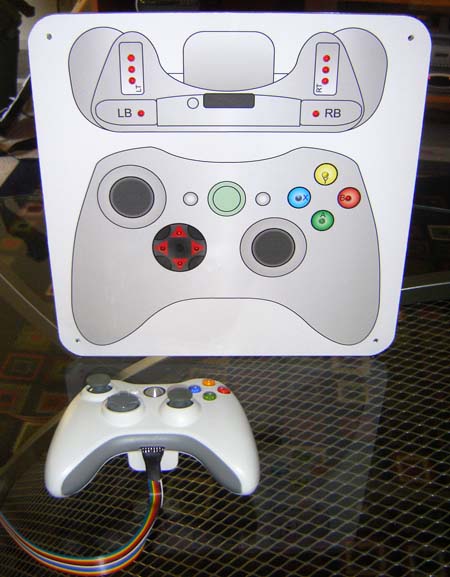
I’ve had some good feedback from my Measuring Responsiveness in Video Game article, which explains how to use a cheap camera to measure the lag between presing a button and the result appearing on screen.   One of the problems with the method I was using is that it does not let you measure responsiveness in typical gameplay situations, since you have to set up the controller so you can see the button being pressed, which means your finger or thumb has to start moving while not touching the button – generally not the case in normal gameplay.

The guys at Infinity Ward saw this problem, and their solution was to commission modder Benjamin Heckendorn to build a custom joystick that had a seperate display with an individual LED for each button.  Here’s the result:

With this setup, the board can just be placed next to the monitor, and both videoed together in normal gameplay.   Specific moves and events can then be isolated, and the frames counted in the video to measure the responsiveness. 

Frame-by-frame analysis of the button presses might also be useful for some analysis along the line of what I suggest in Pushing Buttons, although that’s still better done in code.

[UPDATE]  Ben now has a more detailed post on the controller on his site, with videos of it in action:

http://benheck.com/12-05-2008/controller-monitor-built-for-infinity-ward-game-testing

November 15th, 2008

My coding practices in 1991

I wrote this in 1991, when I was writing Amiga and Atari ST games for Ocean Software in Manchester, UK. I think at the time I was working on Parasol Stars. It’s an interesting look at a simpler time in games programming.

An explanation of my 68000 development system - by Mick West
------------------------------------------------------------

The purpose of this document is twofold:

	1 - To make the meaning of my code a touch more accesible
            to those that may come after me.

	2 - To remind me of the meaning of my code.

Fundamentals
------------

	A 68000 development system, at present only encompassing
the Atari ST and the Commodore Amiga. My present System is PC
based, using the SNASM assembler, though this could change.

	I try to be modular and to this end I have lots of small
INCLUDE files that contain short modules of code to do things
like random numbers, heap management, sprite printing, etc.
	These modules are (hopefully) written to use the minimum
of extrenal references and ideally to incorporate the functions
of an Abstract Data Type - ie a 'Black Box' of code that can
only be accessed by calling a number of specified routines. The
ADT module can do whatever function it is required to do in
whatever way it wants so long as it fullfills the specifications.
	A good example is the scroll routines I wrote at the
start of the 'Darkman' project. I actually wrote three diffent
scroll routines and they all did the same thing, but in
different ways, some quicker, some using less memory. All three
had the same external interface with the same named routines
(SETUP_MAP_BUFFER, MOVE_LEFT_4, etc) to facilitated the screen
scrolling. I could simply include one instead of the other and
the program would assemble exactly the same.

	There are a set of fundamental routines that practically
all games require, You need to read the keyboard, you need a
Vertical Blank Interrupt, you need a double buffered screen, you
need some way of reserving areas of memory. These basic routines
are provide by the file KERNAL.S.
	For all my projects, the first part of the source code
will INCLUDE \DEV\KERNAL.S. I should point out at this point
that all my modules that are not entirely specific to a
particular project are kept in a folder called \dev, which
should also include this file you are reading now.

	Let's have a look at the very simplest program you can
write using this method:

;;;;;;;;;;;;;;;;;;;;;;;;;;;;;;;;;;
; SIMPLE.S - A very simple program

	org	$1000
	regs	pc=$1000,sr=2700
	include	c:\dev\kernal.s
main
	bra	main
my_vbl
	trap	#0
	rts   

; data areas
		rsset	free_memory
something	rs.b	10000

; end of SIMPLE.S
;;;;;;;;;;;;;;;;;;;;;;;;;;;;;;;;;;;

	Ignoring the comments and blank lines, the first two
lines are to tell SNASM where to assemble the program to and to
turn the interrupts off before running.
	The next line includes the kernal routines, as it is at
the start of the program then the first thing that will be
executed will be a small routine at the start of KERNAL.S that
kills the interrupt vectors, sets up the double buffered screen,
installs a keyboard interrupt and sets up a VBL.
	The kernal needs two external labels: MAIN and MY_VBL.
The first, MAIN (memories of C) is just the start of your
program. The second, MY_VBL is a routine that is called once per
Vertical Blank Interrupt.
	In the example above, all MAIN does is go into a loop.
All MY_VBL does is a TRAP #0 to give SNASM access to the
machine. This is not done in the kernal because you might want
some control over when you let SNASM get it's claws in, maybe
one per game cycle or whatever.

	The last couple of lines are rather fundamental in that
they illustrate how I do my memory organisation. The Kernal
allows a fixed amount (configurable, the default is 100K) for
your raw code (ie - the assembled code, including all modules).
All memory above that is assumed to be free and is reserved
using the RS directive (which I use extensivly, so you have to
understand it to understand me).
	The kernal will reserve about 70k itself for the two
screens and the stack. Then the lable FREE_MEMORY will be SET to
the end of this reserved memory. Any modules that you include
may also reserve memory, if so they will set FREE_MEMORY to the
end of the area they have just reserved. So in your main
program, if you want to reserve areas of memory then you will
simply use 'RSSET free_memory' to set the __RS variable
correctly and the just use RS to Reserve Space as desired.
	If you are writing a module that needs memory then in
addition to the above you will also need to SET the FREE_MEMORY
variable so other modules and your main code recognises what you
have done.
	This may sound complicated (it does to me!) but if you
just look back at the example program you can see that in
practice it is really very simple.

	More about the Kernal - since this is common to every
program I write, I shall describe it's functions here. Modules
should (if I have the time/inclination/energy) have a full
specification at the start of the source. So if you want to know
what it does, read the comments not the code!

Kernal Configuartion variables (compile time)
if these are undefined then they will be given a default
	ST		true if target is an ST (true)
	THE_RPF		rasters per frame (1)
	MAX_CODE	max code size (100*1024)
	RASTER_COUNT	if true then will display a raster count (false)

Kernal Variables for external usage.
	TIME.L		starts as zero, increments every VBL
	SCREEN.L	address of the virtual screen
	REAL.L		address of the real screen

Major kernal routines
	FLIP_SCREENS	flips screen and real (waits for RPF)

Major macros
	PUSHEM		save registers (always long)
	POPEM
	PUSH.s		save a register (sized)
	POP.s
	PAUSE jiffies	hangs for a certain time
	CLS screen	fills 32000 bytes with 0

This is not everything in the kernal, you should look at the
source comments for that.

Mick's Code Style Conventions
-----------------------------

	I am trying to develop a consistent style of writing
code, this will cut down on having to write unique routines
every time I write a new program. The style should not just be
about code, but about data structures and how the code accesses
them. Eventually I hope to have macros for the most common code
structures as soon as I have them fully formalised.

Mick's Maxims (not in order!!) (!)
-------------

1 - Use Meaningful Labels!
2 - Use Local Labels!
3 - Save Registers!
4 - Don't repeat code, put it in a routine or a macro!
5 - Don't use numbers, use equates!
6 - Use lower case!
7 - Use data structures!
8 - Use consistent program structures!
9 - Use Comments!
10- Make Backups! 

1 - Use Meaningful Labels! By meaningful I mean use full words,
not abbriviations, use underscores to separate words, use the
proper tense for the word and the correct plurality. EG:
	setup_heap
	flip_screens
	move_baddies
	game_over
	file_not_found

2 - Use local labels! Only use global labels for routines that
can be accessed externally. ALL labels within a routine
(including any local variables it uses) MUST be local. EG:

main_routine
	clr.w	d0
.loop
	add.w	#1,.counter
	bsr	another_routine
	bne	.loop
	rts
.counter	dc.w	0

next_routine
	...

3 - Save Registers! Unless you formally specify otherwise, all
registers not used to return values should be UNCHANGED when the
routine returns to caller. If you want to write faster versions
then do so, but SPECIFY that they may corrupt registers.

4 - Don't repeat code! Put it in a routine or a macro!

5 - Don't use numbers! Use equates! EG:

	add.w	#4,man_x		; is WRONG
	add.w	#walking_speed,man_x	; is RIGHT

6 - Use lower case! Upper case programs are a useless reminder
of the ancient days of computing. They make programs difficult
to read, and your comments either have to be in upper case, or
you have to mess around with the CAPS LOCK key. It's just a
waste of time.

7 - Use data structures! This is a big subject, addressed later.

8 - Use consistent program structures! Like mine for example.

9 - Use Comments! At the very minimum each routine should have
one comment, on  the line before the label. This should give a
brief description of what the routine does and it's input and
output requirements. A full specification of a routine should
include the following.
	Exact input/output requirements
	Register corruption
	The external references it needs
	Brief explanation (one line is ok) of the algorithm
	Possible areas for improvement
	Known bugs still to be fixed
As well as the comments at the start of a routine it is usually
a good idea to have comments in the routine itself. For
espescially complex routines it is a great help to development
to comment EVERY line to provide information on: Flow of
control, meaning of decisions, contents of registers and just
general elucidation of exactly what you think you are doing.

10 - Make Backups! Not strictly a coding requirement, but still
a vital part of development. I use an Archive program and have a
batch file to archive everything in the \DEV folder and
everything in the folder containing the project that I am
currently working on. They are archived to hard disk and then
copied to floppy, which is then taken home and copied to my hard
disk there.
	Besides the obvious frustration of having to rewrite
code that you have already slaved hours over, there is the fact
that there is a lot of money at stake here. Think money, make backup!

	Right, that's enough maxims for one day (ten was good
enough for Moses so it'll do for me) Now, let's expand on the
dual topics of Data Structures and Program structures.
	At university they taught me somthing called 'Data
Driven Design', the idea was that you built your program around
the structure of what you were doing things too, the data.
	They also waffled a lot about Abstract Data Types which
I described briefly earlier and involve keeping the data
structure seperate from the program code.
  	Data driven design is really a very simple concept. Put
at it's most basic level all you do is list everything in the
program and then write routines to handle each of them.

	This document is not supposed to be a beginners guide to
structured programming, so I'll just describe what I do, and
what I think I might do if I get around to it.

	What came first, the program structure or the data
structure? I usually start with a loose outline of the program
structure and then write some specific data structures and then
the program and the data structures evolve together as they
respond to changing needs and new idea. This is not the way it
should be, but it has happend like that because of the usual
lack of time and energy. 

	Anyway, enough waffling, what is a data structure? Well,
it's like a RECORD in pascal or a STRUCT in C, which probably
leaves you none the wiser. Essentially it is an array or a list
of groups of bytes. It is best illustrated by an example.
	Say you are writing galaxians or something similar,
obviously you need to store the positions of all the aliens. To
do this you will just have a list of say 20 bytes for each
alien, in those 20 bytes you will store information such as the
x and y position, the speed, the sprite number, the energy, what
it will score, how long before it next does something and things
like that, depending on your game.
	To get information on a specifc alien you point an
address register to the base of the alien and then use offsets
to access the various bits fo data in that alien. EG:

	lea	alien,a0		; address of alien
	move.w	(a0),d0			; get x
	move.w	2(a0),d1		; get y
	move.w	4(a0),d2		; get sprite number
	bsr	draw_alien		; draw it

	In line with my maxim "don't use numbers", I dont use
numbers as the offsets. Instead I define my structures using the
RS command. This let's you set up a data structure as if you
were defining variables using DS, but instead of the labels
being absolute addresses they will be offsets relative to the
start of the code. For example:

		rsreset			; new data structure
alien_flag	rs.w	1
alien_x		rs.w	1
alien_y		rs.w	1
alien_xv	rs.w	1
alien_yv	rs.w	1
alien_sprite	rs.w	1
alien_energy	rs.w	1
alien_len	rs.w	0

	Having set up a data structure I will define an area of
memory at the end of the program (using RS and explained a page
or so ago) like:

alien_table	rs.w	max_alien*alien_len+2

	The table will be initialised by:

		fill	#alien_table,#max_alien*alien_len,#0
		move.w	#-2,alien_table+max_alien*alien_len

	So the extra word at the end of the table will be in
effect a dummy entry in the list with a flag value of -2. I
usually end my lists with a negative value in the first field.

	There will be a routine called NEW_ALIEN that will
return a0 as the first free baddy in the list. My usual way of
going through all the objects in a list is as follows:

	lea	alien_table-alien_len,a0
.next_alien
	lea	alien_len(a0),a0
	tst.w	alien_flag(a0)
	beq	.next_alien
	bmi	.done

; just an example of the sort of thing I might do with it.
	move.w	alien_x(A0),d0
	move.w	alien_y(a0),d1
	move.w	alien_sprite(a0),d2
	bsr	draw_sprite

	bra	.next_alien
.done

	You can kill a object using

		clr.w	alien_flag(A0)

	This sort of structure is the fundamental basis of my
programs at the moment.

-------------------------------------------------------------
	I have written this in a brief attempt to slightly
formalise what I am doing, mostly to get a few things clear in
my own mind. So if you are not me and this does not seem
entirely sensible to you then hard luck...